
Mediator Pattern

The Mediator Pattern is a behavioral design pattern that centralizes communication between objects. Instead of objects talking to each other directly (which creates a tangled web of dependencies), they communicate through a mediator that coordinates interactions.
Think of an airport control tower. Pilots don’t talk directly to every other plane—they talk to the control tower, which manages traffic safely. That’s the Mediator Pattern in action.
The Problem
In a complex UI system, components often talk to each other directly:
// Without Mediator Pattern - tightly coupled components
class LoginForm {
    private Button loginButton;
    private TextBox username;
    private TextBox password;
    private Checkbox rememberMe;

    public LoginForm() {
        loginButton = new Button();
        username = new TextBox();
        password = new TextBox();
        rememberMe = new Checkbox();

        username.setOnChange(() -> validate());
        password.setOnChange(() -> validate());
        rememberMe.setOnChange(() -> toggleRememberMe());
    }

    private void validate() {
        if (username.getText().isEmpty() || password.getText().isEmpty()) {
            loginButton.disable();
        } else {
            loginButton.enable();
        }
    }

    private void toggleRememberMe() {
        // Direct cross-component logic
    }
}
Problems:
Tight coupling: Each component knows too much about others
Hard to reuse: Components are glued to specific screens
Difficult to maintain: Changes ripple across components
Complex dependencies: Many-to-many communication spaghetti
The Solution: Mediator Pattern
The Mediator Pattern introduces a mediator that handles all communication.
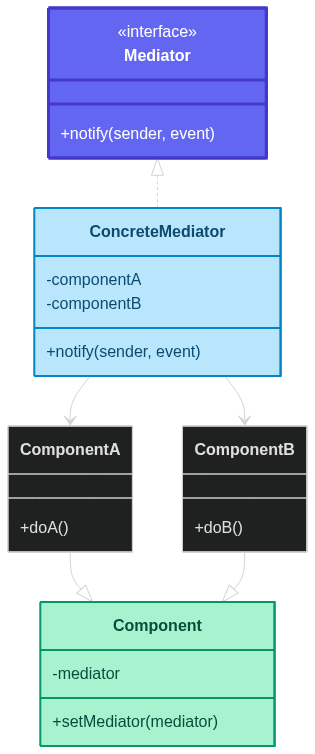 ](
](The pattern separates:
Who communicates (Components)
How they communicate (Mediator)
When they react (Mediator logic)
How It Solves Each Problem
| Problem | How Mediator Pattern Solves It |
|---|---|
| Tight coupling | Components no longer reference each other directly—only the mediator. |
| Hard to reuse | Components become reusable because they only depend on the mediator interface. |
| Difficult to maintain | Communication rules are centralized in one place. |
| Complex dependencies | Many-to-many communication is replaced by one-to-many. |
Key Components
Mediator: Interface defining communication rules
ConcreteMediator: Implements coordination logic
Component: Base class for UI elements or system modules
ConcreteComponents: Actual interacting objects
How It Solves the Problem

Real-World Implementation
Example 1: Chat Room (Classic Mediator)
import java.util.ArrayList;
import java.util.List;

// Mediator Interface
interface ChatMediator {
    void sendMessage(String message, User user);
    void addUser(User user);
}

// Concrete Mediator
class ChatRoom implements ChatMediator {
    private List<User> users = new ArrayList<>();

    @Override
    public void addUser(User user) {
        users.add(user);
    }

    @Override
    public void sendMessage(String message, User sender) {
        for (User user : users) {
            if (user != sender) {
                user.receive(message, sender.getName());
            }
        }
    }
}

// Colleague
class User {
    private String name;
    private ChatMediator mediator;

    public User(String name, ChatMediator mediator) {
        this.name = name;
        this.mediator = mediator;
    }

    public void send(String message) {
        System.out.println(name + " sends: " + message);
        mediator.sendMessage(message, this);
    }

    public void receive(String message, String sender) {
        System.out.println(name + " receives from " + sender + ": " + message);
    }

    public String getName() {
        return name;
    }
}

// Client
public class ChatDemo {
    public static void main(String[] args) {
        ChatMediator chatRoom = new ChatRoom();

        User alice = new User("Alice", chatRoom);
        User bob = new User("Bob", chatRoom);
        User carl = new User("Carl", chatRoom);

        chatRoom.addUser(alice);
        chatRoom.addUser(bob);
        chatRoom.addUser(carl);

        alice.send("Hello everyone!");
        bob.send("Hey Alice!");
    }
}
Example 2: UI Form Mediator
import java.util.function.Consumer;

// Mediator Interface
interface FormMediator {
    void notify(Component component, String event);
}

// Base Component
abstract class Component {
    protected FormMediator mediator;

    public Component(FormMediator mediator) {
        this.mediator = mediator;
    }
}

class Button extends Component {
    private boolean enabled = false;

    public Button(FormMediator mediator) {
        super(mediator);
    }

    public void click() {
        if (enabled) {
            System.out.println("Login clicked!");
        }
    }

    public void enable() {
        enabled = true;
        System.out.println("Button enabled");
    }

    public void disable() {
        enabled = false;
        System.out.println("Button disabled");
    }
}

class TextBox extends Component {
    private String text = "";

    public TextBox(FormMediator mediator) {
        super(mediator);
    }

    public void setText(String text) {
        this.text = text;
        mediator.notify(this, "textChanged");
    }

    public String getText() {
        return text;
    }
}

class LoginFormMediator implements FormMediator {
    private Button loginButton;
    private TextBox username;
    private TextBox password;

    public LoginFormMediator(Button loginButton, TextBox username, TextBox password) {
        this.loginButton = loginButton;
        this.username = username;
        this.password = password;
    }

    @Override
    public void notify(Component component, String event) {
        if (event.equals("textChanged")) {
            if (!username.getText().isEmpty() && !password.getText().isEmpty()) {
                loginButton.enable();
            } else {
                loginButton.disable();
            }
        }
    }
}

// Client
public class LoginDemo {
    public static void main(String[] args) {
        Button loginButton = new Button(null);
        TextBox username = new TextBox(null);
        TextBox password = new TextBox(null);

        LoginFormMediator mediator = new LoginFormMediator(loginButton, username, password);

        // Inject mediator
        loginButton.mediator = mediator;
        username.mediator = mediator;
        password.mediator = mediator;

        username.setText("alice");
        password.setText("");
        password.setText("secret");
    }
}
Example 3: Air Traffic Control
import java.util.ArrayList;
import java.util.List;

// Mediator
interface ControlTower {
    void requestLanding(Plane plane);
    void requestTakeoff(Plane plane);
    void addPlane(Plane plane);
}

class AirportControlTower implements ControlTower {
    private List<Plane> planes = new ArrayList<>();

    @Override
    public void addPlane(Plane plane) {
        planes.add(plane);
    }

    @Override
    public void requestLanding(Plane plane) {
        System.out.println("Tower: " + plane.getId() + " cleared to land");
    }

    @Override
    public void requestTakeoff(Plane plane) {
        System.out.println("Tower: " + plane.getId() + " cleared to takeoff");
    }
}

class Plane {
    private String id;
    private ControlTower tower;

    public Plane(String id, ControlTower tower) {
        this.id = id;
        this.tower = tower;
    }

    public void requestLanding() {
        tower.requestLanding(this);
    }

    public void requestTakeoff() {
        tower.requestTakeoff(this);
    }

    public String getId() {
        return id;
    }
}

// Client
public class AirportDemo {
    public static void main(String[] args) {
        ControlTower tower = new AirportControlTower();
        Plane p1 = new Plane("AA123", tower);
        Plane p2 = new Plane("BA456", tower);

        tower.addPlane(p1);
        tower.addPlane(p2);

        p1.requestLanding();
        p2.requestTakeoff();
    }
}
Workflow Diagram

Real-World Use Cases
GUI Systems: Dialog boxes, form validation, UI coordination
Chat Applications: User messaging via a central server
Air Traffic Control: Central control for planes
Workflow Engines: Coordinating tasks and processes
Game Development: Mediating between objects like player, NPCs, and UI
Microservices Gateways: Centralized API orchestration
Event Bus Systems: Mediator as an event dispatcher
When to Use the Mediator Pattern
✅ Use When
Many-to-Many Communication: Components are overly connected
Reusable Components: You want UI or modules to be reused
Centralized Control: You want one place for interaction rules
Complex Workflows: Many objects interact in complex ways
Loose Coupling: Reduce dependencies between classes
❌ Avoid When
Simple Systems: Direct calls are fine
Single Interaction: No need for mediator
Mediator Becomes God Object: Avoid putting too much logic in one mediator
Benefits
Loose Coupling: Components depend only on mediator
Single Responsibility: Each component focuses on its role
Easier Maintenance: Changes centralized in mediator
Reusable Components: Components are no longer context-specific
Simpler Extensions: Add new components without breaking old ones
Drawbacks
Mediator Complexity: Can become too large if overloaded
Single Point of Failure: Mediator is critical for communication
Hidden Flow: Debugging can be harder since communication is indirect
Mediator vs Observer Pattern

| Aspect | Mediator | Observer |
|---|---|---|
| Purpose | Central coordination | Event-based notification |
| Coupling | Reduced between colleagues | Loose between subjects & observers |
| Communication | Two-way, orchestrated | One-way broadcasts |
| Control | Centralized logic | Decentralized reactions |
Best Practices
Keep Mediator Focused: Avoid a "god object"
Use Interfaces: Depend on
Mediatornot concrete classEvent-driven Updates: Use event types for clarity
Test Mediator Logic: Central logic deserves tests
Avoid Excessive Indirection: Don’t overuse for simple cases
Conclusion
The Mediator Pattern reduces chaos by centralizing communication. It shines when many components need to coordinate without tightly coupling themselves together.
Remember: Let the mediator handle the drama! 🎭

🎯 Key Takeaway
The Mediator Pattern is about centralizing communication. When too many objects talk to each other directly, introduce a mediator to keep the system sane.
Two components argued for hours until the Mediator stepped in and said, "Stop direct messaging—I'm literally here for this." 😄
Happy Mediating! 🎭✨


