

Command Pattern

The Command Pattern is a behavioral design pattern that encapsulates a request as an object. This lets you parameterize actions, queue or log requests, and support undo/redo operations. It turns "do this" into a reusable, first-class object.
Think of a restaurant: you don't walk into the kitchen and cook your meal. You give your order (command) to a waiter (invoker), who passes it to the chef (receiver). The waiter doesn't need to know how to cook—they just deliver commands.
The Problem
Imagine you're building a text editor. Without the Command Pattern, your UI is tightly coupled to specific actions:
// Without Command Pattern - tightly coupled
class TextEditor {
    private StringBuilder text = new StringBuilder();

    public void boldButtonClicked() {
        // Direct action - no undo support
        text.insert(0, "<b>").append("</b>");
    }

    public void italicButtonClicked() {
        text.insert(0, "<i>").append("</i>");
    }

    public void undoClicked() {
        // How do we undo? We have no history! 😱
    }
}
Problems:
No undo/redo: Actions are executed directly with no history
Tight coupling: UI knows too much about implementation
Hard to extend: Adding new actions requires modifying existing code
No queuing: Can't schedule or batch operations
The Solution: Command Pattern
The Command Pattern encapsulates each action as an object with a common interface.
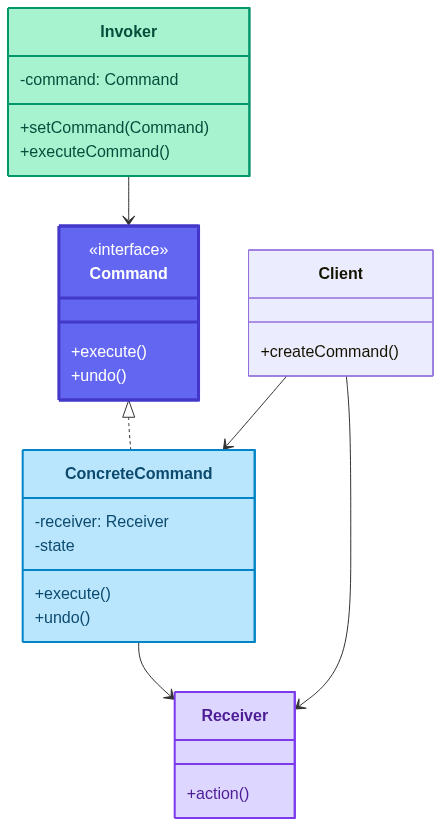
The pattern separates:
What to do (Command)
Who does it (Receiver)
When to do it (Invoker)
How It Solves Each Problem
| Problem | How Command Pattern Solves It |
|---|---|
| No undo/redo | Each command stores its previous state and implements undo(). A history stack tracks executed commands for easy reversal. |
| Tight coupling | The invoker (UI) only knows the Command interface—not the receiver or implementation details. You can swap commands without touching the UI. |
| Hard to extend | Adding a new action = adding a new Command class. No existing code changes. Open/Closed Principle in action. |
| No queuing | Commands are objects, so you can store them in queues, schedule them, log them, or even serialize them for later execution. |
In essence, the Command Pattern turns verbs into nouns. Instead of calling light.on() directly, you create a LightOnCommand object. That object can be stored, passed around, undone, or replayed—giving you full control over when and how actions happen.
Key Components
Command: Interface declaring
execute()and optionallyundo()ConcreteCommand: Implements the command, holds a reference to the receiver
Receiver: The object that performs the actual work
Invoker: Triggers the command (doesn't know how it works)
Client: Creates commands and assigns them to invokers
How It Solves the Problem


Real-World Implementation
Example 1: Smart Home Remote Control
// Command Interface
interface Command {
    void execute();
    void undo();
}

// Receiver - Light
class Light {
    private String location;

    public Light(String location) {
        this.location = location;
    }

    public void on() {
        System.out.println(location + " light is ON");
    }

    public void off() {
        System.out.println(location + " light is OFF");
    }
}

// Receiver - Fan
class Fan {
    private String location;
    private int speed = 0;

    public Fan(String location) {
        this.location = location;
    }

    public void high() {
        speed = 3;
        System.out.println(location + " fan is on HIGH");
    }

    public void medium() {
        speed = 2;
        System.out.println(location + " fan is on MEDIUM");
    }

    public void low() {
        speed = 1;
        System.out.println(location + " fan is on LOW");
    }

    public void off() {
        speed = 0;
        System.out.println(location + " fan is OFF");
    }

    public int getSpeed() {
        return speed;
    }
}

// Concrete Commands
class LightOnCommand implements Command {
    private Light light;

    public LightOnCommand(Light light) {
        this.light = light;
    }

    @Override
    public void execute() {
        light.on();
    }

    @Override
    public void undo() {
        light.off();
    }
}

class LightOffCommand implements Command {
    private Light light;

    public LightOffCommand(Light light) {
        this.light = light;
    }

    @Override
    public void execute() {
        light.off();
    }

    @Override
    public void undo() {
        light.on();
    }
}

class FanHighCommand implements Command {
    private Fan fan;
    private int prevSpeed;

    public FanHighCommand(Fan fan) {
        this.fan = fan;
    }

    @Override
    public void execute() {
        prevSpeed = fan.getSpeed();
        fan.high();
    }

    @Override
    public void undo() {
        switch (prevSpeed) {
            case 0: fan.off(); break;
            case 1: fan.low(); break;
            case 2: fan.medium(); break;
            case 3: fan.high(); break;
        }
    }
}

// No-Op Command (Null Object Pattern)
class NoCommand implements Command {
    @Override
    public void execute() { }

    @Override
    public void undo() { }
}

// Invoker - Remote Control
class RemoteControl {
    private Command[] onCommands;
    private Command[] offCommands;
    private Command undoCommand;

    public RemoteControl() {
        onCommands = new Command[7];
        offCommands = new Command[7];
        Command noCommand = new NoCommand();
        for (int i = 0; i < 7; i++) {
            onCommands[i] = noCommand;
            offCommands[i] = noCommand;
        }
        undoCommand = noCommand;
    }

    public void setCommand(int slot, Command onCommand, Command offCommand) {
        onCommands[slot] = onCommand;
        offCommands[slot] = offCommand;
    }

    public void onButtonPressed(int slot) {
        onCommands[slot].execute();
        undoCommand = onCommands[slot];
    }

    public void offButtonPressed(int slot) {
        offCommands[slot].execute();
        undoCommand = offCommands[slot];
    }

    public void undoButtonPressed() {
        System.out.println("--- UNDO ---");
        undoCommand.undo();
    }
}

// Client
public class SmartHomeDemo {
    public static void main(String[] args) {
        RemoteControl remote = new RemoteControl();

        Light livingRoomLight = new Light("Living Room");
        Fan ceilingFan = new Fan("Living Room");

        remote.setCommand(0, new LightOnCommand(livingRoomLight),
                            new LightOffCommand(livingRoomLight));
        remote.setCommand(1, new FanHighCommand(ceilingFan),
                            new NoCommand());

        remote.onButtonPressed(0);   // Living Room light is ON
        remote.offButtonPressed(0);  // Living Room light is OFF
        remote.undoButtonPressed();  // UNDO -> Living Room light is ON

        remote.onButtonPressed(1);   // Living Room fan is on HIGH
        remote.undoButtonPressed();  // UNDO -> Fan returns to previous speed
    }
}
Example 2: Text Editor with Undo/Redo
import java.util.Stack;

// Command Interface
interface TextCommand {
    void execute();
    void undo();
}

// Receiver
class TextDocument {
    private StringBuilder content = new StringBuilder();

    public void insert(int position, String text) {
        content.insert(position, text);
        System.out.println("Inserted: \"" + text + "\" -> " + content);
    }

    public void delete(int position, int length) {
        String deleted = content.substring(position, position + length);
        content.delete(position, position + length);
        System.out.println("Deleted: \"" + deleted + "\" -> " + content);
    }

    public String getContent() {
        return content.toString();
    }

    public int length() {
        return content.length();
    }
}

// Concrete Commands
class InsertCommand implements TextCommand {
    private TextDocument document;
    private String text;
    private int position;

    public InsertCommand(TextDocument document, int position, String text) {
        this.document = document;
        this.position = position;
        this.text = text;
    }

    @Override
    public void execute() {
        document.insert(position, text);
    }

    @Override
    public void undo() {
        document.delete(position, text.length());
    }
}

class DeleteCommand implements TextCommand {
    private TextDocument document;
    private String deletedText;
    private int position;
    private int length;

    public DeleteCommand(TextDocument document, int position, int length) {
        this.document = document;
        this.position = position;
        this.length = length;
    }

    @Override
    public void execute() {
        deletedText = document.getContent().substring(position, position + length);
        document.delete(position, length);
    }

    @Override
    public void undo() {
        document.insert(position, deletedText);
    }
}

// Invoker with History
class TextEditor {
    private TextDocument document = new TextDocument();
    private Stack<TextCommand> undoStack = new Stack<>();
    private Stack<TextCommand> redoStack = new Stack<>();

    public void executeCommand(TextCommand command) {
        command.execute();
        undoStack.push(command);
        redoStack.clear();
    }

    public void undo() {
        if (!undoStack.isEmpty()) {
            TextCommand command = undoStack.pop();
            command.undo();
            redoStack.push(command);
        }
    }

    public void redo() {
        if (!redoStack.isEmpty()) {
            TextCommand command = redoStack.pop();
            command.execute();
            undoStack.push(command);
        }
    }

    public TextDocument getDocument() {
        return document;
    }
}

// Client
public class TextEditorDemo {
    public static void main(String[] args) {
        TextEditor editor = new TextEditor();
        TextDocument doc = editor.getDocument();

        editor.executeCommand(new InsertCommand(doc, 0, "Hello"));
        editor.executeCommand(new InsertCommand(doc, 5, " World"));
        editor.executeCommand(new InsertCommand(doc, 11, "!"));

        System.out.println("\n--- Undo ---");
        editor.undo();
        editor.undo();

        System.out.println("\n--- Redo ---");
        editor.redo();

        System.out.println("\nFinal: " + doc.getContent());
    }
}
Example 3: Macro Commands (Composite)
import java.util.ArrayList;
import java.util.List;

// Macro Command - executes multiple commands
class MacroCommand implements Command {
    private List<Command> commands = new ArrayList<>();

    public void addCommand(Command command) {
        commands.add(command);
    }

    @Override
    public void execute() {
        for (Command command : commands) {
            command.execute();
        }
    }

    @Override
    public void undo() {
        // Undo in reverse order
        for (int i = commands.size() - 1; i >= 0; i--) {
            commands.get(i).undo();
        }
    }
}

// Usage
public class MacroDemo {
    public static void main(String[] args) {
        Light light = new Light("Living Room");
        Fan fan = new Fan("Living Room");

        MacroCommand partyMode = new MacroCommand();
        partyMode.addCommand(new LightOnCommand(light));
        partyMode.addCommand(new FanHighCommand(fan));

        System.out.println("--- Party Mode ON ---");
        partyMode.execute();

        System.out.println("\n--- Party Mode OFF (Undo) ---");
        partyMode.undo();
    }
}
Workflow Diagram

Real-World Use Cases
GUI Buttons & Menus: Each button triggers a command object
Undo/Redo Systems: Text editors, graphic tools, IDEs
Transaction Systems: Database operations, banking
Task Scheduling: Job queues, cron-like systems
Macro Recording: Record and replay sequences of actions
Game Development: Player actions, replay systems
Networking: Request queuing, retry mechanisms
When to Use the Command Pattern
✅ Use When
Undo/Redo Required: You need to reverse operations
Decouple Invoker & Receiver: UI shouldn't know implementation details
Queue Operations: Schedule, log, or batch commands
Macro Support: Combine multiple commands into one
Callback Replacement: Need object-oriented callbacks
❌ Avoid When
Simple Actions: Overhead isn't justified for trivial operations
No History Needed: Direct method calls are simpler
Performance Critical: Command objects add memory overhead
Benefits
Decoupling: Invoker and receiver are independent
Undo/Redo: Easy to implement with command history
Extensibility: Add new commands without changing existing code
Composability: Combine commands into macros
Logging & Auditing: Commands can be logged for replay
Drawbacks
Class Explosion: Each action needs its own command class
Complexity: More classes and indirection
Memory Overhead: Storing command history consumes memory
Command vs Strategy Pattern

| Aspect | Command | Strategy |
|---|---|---|
| Purpose | Encapsulate request | Encapsulate algorithm |
| Undo | Supports undo/redo | No undo support |
| State | Often stateful | Usually stateless |
| Use Case | Actions, transactions | Interchangeable behaviors |
Best Practices
Keep Commands Small: One action per command
Store State for Undo: Save previous state before executing
Use Null Object:
NoCommandavoids null checksConsider Macro Commands: Group related commands
Immutable Commands: Avoid modifying command state after creation
Limit History Size: Prevent memory leaks in undo stacks
Conclusion
The Command Pattern transforms actions into objects, enabling powerful features like undo/redo, queuing, logging, and macro recording. It decouples the requester from the executor, making your code flexible and extensible.
Remember: When in doubt, command it out! 🎮

🎯 Key Takeaway
The Command Pattern is about turning actions into objects. When you need undo, queuing, or decoupling—command it!
Interviewer: "What happens if your code crashes production?" Candidate: "I cry." Interviewer: "And if you used the Command Pattern?" Candidate: "I cry... then hit undo." 😂
Happy Commanding! 🎮✨


