

Iterator Pattern

The Iterator Pattern is a behavioral design pattern that provides a way to access elements of a collection sequentially without exposing its underlying representation. It decouples the traversal logic from the collection itself, allowing you to iterate over different data structures using a uniform interface.
Think of a TV remote with "Next" and "Previous" buttons. You don't need to know how channels are stored internally—you just press the button and move through them. That's the Iterator Pattern in action.
The Problem
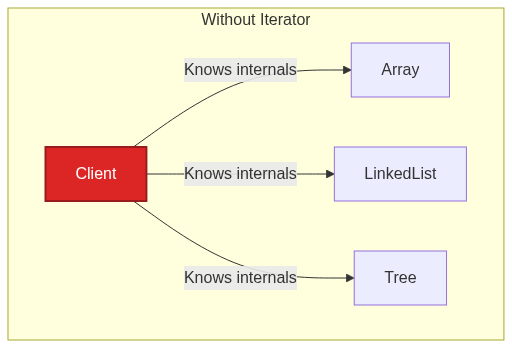
Imagine you're building an app that needs to traverse different types of collections—arrays, linked lists, trees, graphs. Without the Iterator Pattern, your code becomes tightly coupled to each collection's internal structure:
// Without Iterator Pattern - tightly coupled traversal
class PlaylistManager {

    // For array-based playlist
    public void playFromArray(Song[] songs) {
        for (int i = 0; i < songs.length; i++) {
            songs[i].play();
        }
    }

    // For list-based playlist
    public void playFromList(List<Song> songs) {
        for (int i = 0; i < songs.size(); i++) {
            songs.get(i).play();
        }
    }

    // For tree-based playlist? Graph-based? 😱
    // Different traversal logic for each!
}
Problems:
Tight coupling: Client code knows internal structure of each collection
Code duplication: Similar traversal logic repeated for each collection type
Hard to extend: Adding new collection types requires modifying client code
Single traversal: Can't have multiple simultaneous traversals on the same collection
The Solution: Iterator Pattern
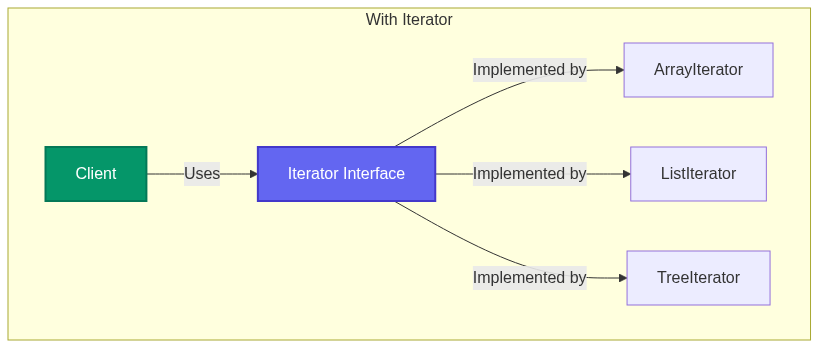
The Iterator Pattern extracts traversal logic into separate iterator objects with a common interface.
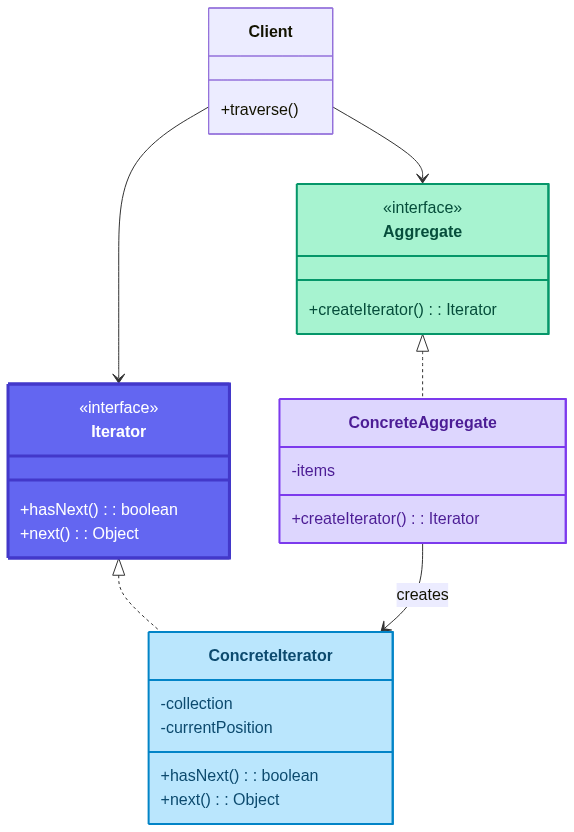
The pattern separates:
What to traverse (Aggregate/Collection)
How to traverse (Iterator)
Who traverses (Client)
How It Solves Each Problem
| Problem | How Iterator Pattern Solves It |
|---|---|
| Tight coupling | Client only knows the Iterator interface—not the collection's internal structure. |
| Code duplication | One traversal loop works for any collection that provides an iterator. |
| Hard to extend | New collections just implement createIterator()—no client changes needed. |
| Single traversal | Each iterator maintains its own position, allowing multiple simultaneous traversals. |
Key Components
Iterator: Interface declaring
hasNext()andnext()methodsConcreteIterator: Implements traversal logic for a specific collection
Aggregate: Interface declaring
createIterator()methodConcreteAggregate: The collection that creates its iterator
Client: Uses iterators to traverse collections
How It Solves the Problem
Real-World Implementation
Example 1: Custom Playlist Iterator
import java.util.ArrayList;
import java.util.List;

// Iterator Interface
interface Iterator<T> {
    boolean hasNext();
    T next();
    void reset();
}

// Aggregate Interface
interface IterableCollection<T> {
    Iterator<T> createIterator();
}

// Concrete Aggregate - Playlist
class Playlist implements IterableCollection<Song> {
    private List<Song> songs = new ArrayList<>();

    public void addSong(Song song) {
        songs.add(song);
    }

    public Song getSong(int index) {
        return songs.get(index);
    }

    public int size() {
        return songs.size();
    }

    @Override
    public Iterator<Song> createIterator() {
        return new PlaylistIterator(this);
    }

    // Reverse iterator
    public Iterator<Song> createReverseIterator() {
        return new ReversePlaylistIterator(this);
    }
}

// Song class
class Song {
    private String title;
    private String artist;

    public Song(String title, String artist) {
        this.title = title;
        this.artist = artist;
    }

    public void play() {
        System.out.println("Playing: " + title + " by " + artist);
    }

    @Override
    public String toString() {
        return title + " - " + artist;
    }
}

// Concrete Iterator - Forward
class PlaylistIterator implements Iterator<Song> {
    private Playlist playlist;
    private int currentIndex = 0;

    public PlaylistIterator(Playlist playlist) {
        this.playlist = playlist;
    }

    @Override
    public boolean hasNext() {
        return currentIndex < playlist.size();
    }

    @Override
    public Song next() {
        if (!hasNext()) {
            throw new RuntimeException("No more songs!");
        }
        return playlist.getSong(currentIndex++);
    }

    @Override
    public void reset() {
        currentIndex = 0;
    }
}

// Concrete Iterator - Reverse
class ReversePlaylistIterator implements Iterator<Song> {
    private Playlist playlist;
    private int currentIndex;

    public ReversePlaylistIterator(Playlist playlist) {
        this.playlist = playlist;
        this.currentIndex = playlist.size() - 1;
    }

    @Override
    public boolean hasNext() {
        return currentIndex >= 0;
    }

    @Override
    public Song next() {
        if (!hasNext()) {
            throw new RuntimeException("No more songs!");
        }
        return playlist.getSong(currentIndex--);
    }

    @Override
    public void reset() {
        currentIndex = playlist.size() - 1;
    }
}

// Client
public class MusicPlayerDemo {
    public static void main(String[] args) {
        Playlist playlist = new Playlist();
        playlist.addSong(new Song("Bohemian Rhapsody", "Queen"));
        playlist.addSong(new Song("Hotel California", "Eagles"));
        playlist.addSong(new Song("Stairway to Heaven", "Led Zeppelin"));

        System.out.println("=== Forward Playback ===");
        Iterator<Song> iterator = playlist.createIterator();
        while (iterator.hasNext()) {
            iterator.next().play();
        }

        System.out.println("\n=== Reverse Playback ===");
        Iterator<Song> reverseIterator = playlist.createReverseIterator();
        while (reverseIterator.hasNext()) {
            reverseIterator.next().play();
        }
    }
}
Example 2: Tree Iterator (DFS & BFS)
import java.util.*;

// Tree Node
class TreeNode<T> {
    T value;
    List<TreeNode<T>> children = new ArrayList<>();

    public TreeNode(T value) {
        this.value = value;
    }

    public void addChild(TreeNode<T> child) {
        children.add(child);
    }
}

// Iterator Interface
interface TreeIterator<T> {
    boolean hasNext();
    T next();
}

// DFS Iterator (Depth-First)
class DFSIterator<T> implements TreeIterator<T> {
    private Stack<TreeNode<T>> stack = new Stack<>();

    public DFSIterator(TreeNode<T> root) {
        if (root != null) {
            stack.push(root);
        }
    }

    @Override
    public boolean hasNext() {
        return !stack.isEmpty();
    }

    @Override
    public T next() {
        if (!hasNext()) {
            throw new NoSuchElementException();
        }
        TreeNode<T> node = stack.pop();
        // Push children in reverse order for left-to-right traversal
        for (int i = node.children.size() - 1; i >= 0; i--) {
            stack.push(node.children.get(i));
        }
        return node.value;
    }
}

// BFS Iterator (Breadth-First)
class BFSIterator<T> implements TreeIterator<T> {
    private Queue<TreeNode<T>> queue = new LinkedList<>();

    public BFSIterator(TreeNode<T> root) {
        if (root != null) {
            queue.offer(root);
        }
    }

    @Override
    public boolean hasNext() {
        return !queue.isEmpty();
    }

    @Override
    public T next() {
        if (!hasNext()) {
            throw new NoSuchElementException();
        }
        TreeNode<T> node = queue.poll();
        queue.addAll(node.children);
        return node.value;
    }
}

// Tree with multiple iterators
class Tree<T> {
    private TreeNode<T> root;

    public Tree(TreeNode<T> root) {
        this.root = root;
    }

    public TreeIterator<T> dfsIterator() {
        return new DFSIterator<>(root);
    }

    public TreeIterator<T> bfsIterator() {
        return new BFSIterator<>(root);
    }
}

// Client
public class TreeTraversalDemo {
    public static void main(String[] args) {
        // Build tree:
        //        1
        //      / | \
        //     2  3  4
        //    / \    |
        //   5   6   7

        TreeNode<Integer> root = new TreeNode<>(1);
        TreeNode<Integer> node2 = new TreeNode<>(2);
        TreeNode<Integer> node3 = new TreeNode<>(3);
        TreeNode<Integer> node4 = new TreeNode<>(4);

        root.addChild(node2);
        root.addChild(node3);
        root.addChild(node4);

        node2.addChild(new TreeNode<>(5));
        node2.addChild(new TreeNode<>(6));
        node4.addChild(new TreeNode<>(7));

        Tree<Integer> tree = new Tree<>(root);

        System.out.println("=== DFS Traversal ===");
        TreeIterator<Integer> dfs = tree.dfsIterator();
        while (dfs.hasNext()) {
            System.out.print(dfs.next() + " ");
        }

        System.out.println("\n\n=== BFS Traversal ===");
        TreeIterator<Integer> bfs = tree.bfsIterator();
        while (bfs.hasNext()) {
            System.out.print(bfs.next() + " ");
        }
    }
}

/* Output:
=== DFS Traversal ===
1 2 5 6 3 4 7

=== BFS Traversal ===
1 2 3 4 5 6 7
*/
Example 3: Filtered Iterator
import java.util.ArrayList;
import java.util.List;
import java.util.function.Predicate;

// Filtered Iterator - only returns elements matching a condition
class FilteredIterator<T> implements Iterator<T> {
    private List<T> items;
    private Predicate<T> filter;
    private int currentIndex = 0;
    private T nextItem;
    private boolean hasNextItem = false;

    public FilteredIterator(List<T> items, Predicate<T> filter) {
        this.items = items;
        this.filter = filter;
        findNext();
    }

    private void findNext() {
        hasNextItem = false;
        while (currentIndex < items.size()) {
            T item = items.get(currentIndex++);
            if (filter.test(item)) {
                nextItem = item;
                hasNextItem = true;
                return;
            }
        }
    }

    @Override
    public boolean hasNext() {
        return hasNextItem;
    }

    @Override
    public T next() {
        if (!hasNext()) {
            throw new RuntimeException("No more elements!");
        }
        T result = nextItem;
        findNext();
        return result;
    }

    @Override
    public void reset() {
        currentIndex = 0;
        findNext();
    }
}

// Usage
public class FilteredIteratorDemo {
    public static void main(String[] args) {
        List<Integer> numbers = List.of(1, 2, 3, 4, 5, 6, 7, 8, 9, 10);

        System.out.println("=== Even Numbers Only ===");
        FilteredIterator<Integer> evenIterator =
            new FilteredIterator<>(new ArrayList<>(numbers), n -> n % 2 == 0);

        while (evenIterator.hasNext()) {
            System.out.print(evenIterator.next() + " ");
        }

        System.out.println("\n\n=== Numbers > 5 ===");
        FilteredIterator<Integer> greaterThan5 =
            new FilteredIterator<>(new ArrayList<>(numbers), n -> n > 5);

        while (greaterThan5.hasNext()) {
            System.out.print(greaterThan5.next() + " ");
        }
    }
}

/* Output:
=== Even Numbers Only ===
2 4 6 8 10

=== Numbers > 5 ===
6 7 8 9 10
*/
Workflow Diagram

Real-World Use Cases
Java Collections:
java.util.Iteratorused by all collectionsDatabase Cursors: Iterating over query results
File Systems: Traversing directories and files
UI Components: Iterating over menu items, list views
Streaming Data: Processing data streams element by element
Pagination: Iterating over pages of results
Graph Algorithms: DFS, BFS traversals
When to Use the Iterator Pattern
✅ Use When
Hide Internals: You want to hide collection's internal structure
Uniform Interface: You need a common way to traverse different collections
Multiple Traversals: You need multiple simultaneous traversals
Different Traversals: You need different ways to traverse (forward, reverse, filtered)
Lazy Evaluation: You want to fetch elements on-demand
❌ Avoid When
Simple Collections: A simple for-loop is sufficient
Single Traversal: You only need one way to traverse
Performance Critical: Iterator overhead matters (rare)
Benefits
Single Responsibility: Traversal logic separated from collection
Open/Closed: New iterators without changing collections
Uniform Interface: Same traversal code for different collections
Multiple Iterators: Simultaneous independent traversals
Lazy Iteration: Elements fetched on-demand
Drawbacks
Overhead: Extra classes for simple collections
Complexity: More abstractions to understand
Snapshot Issues: Collection changes during iteration can cause problems
Iterator vs For-Each

| Aspect | Iterator | For-Each |
|---|---|---|
| Control | Explicit (hasNext/next) | Implicit |
| Modification | Can remove during iteration | Cannot modify |
| Multiple | Multiple simultaneous | Single |
| Custom Logic | Full control | Limited |
Best Practices
Fail-Fast: Throw exception if collection modified during iteration
Immutable Iterators: Consider making iterators read-only
Lazy Loading: Fetch elements only when
next()is calledReset Support: Provide
reset()for reusable iteratorsType Safety: Use generics for type-safe iteration
Internal Iterators: Consider lambda-based iteration for simple cases
Conclusion
The Iterator Pattern provides a clean, uniform way to traverse collections without exposing their internal structure. It enables multiple traversal strategies, supports simultaneous iterations, and keeps your code decoupled from specific collection implementations.
Remember: Iterate smarter, not harder! 🔄

🎯 Key Takeaway
The Iterator Pattern is about traversing without knowing. When you need to walk through a collection without caring how it's built—iterate!
An Iterator told its therapist, "I have commitment issues." The therapist asked, "Why?" It said, "I can only move forward, and I never revisit the past." 😄
Happy Iterating! 🔄✨


