

Flyweight Pattern

The Flyweight Pattern is a structural design pattern that minimizes memory usage by sharing common parts of objects instead of storing them separately. It separates intrinsic state (shared, immutable data) from extrinsic state (context-specific data), allowing thousands or millions of objects to be represented efficiently.
Think of a text editor: every character “A” doesn’t need its own font, size, and style object. Instead, all “A” characters can share the same flyweight object, while position and color are supplied externally. This keeps memory usage low and performance high.
The Problem
Imagine building a game with thousands of trees on a map. If each tree object stores its own heavy data (texture, model, mesh), memory usage explodes.
// Without Flyweight - Memory heavy
class Tree {
    private String mesh;    // Huge data
    private String texture; // Huge data
    private int x, y;       // Position
    private int size;
}

// 100,000 trees = 100,000 meshes and textures 😱
This leads to excessive memory usage and slower performance.
The Solution: Flyweight Pattern
The Flyweight Pattern stores heavy shared data once and reuses it across many objects.
Instead of creating a full tree object for every single instance, you create one shared flyweight (e.g., the mesh + texture) and pass only the lightweight context (like x, y, size) when you draw it. This turns 100,000 heavyweight objects into 100,000 tiny references that all point to a small set of shared flyweights.
In short:
Shared data lives in flyweights (intrinsic state)
Per-object data stays outside (extrinsic state)
Memory usage drops dramatically while behavior stays the same
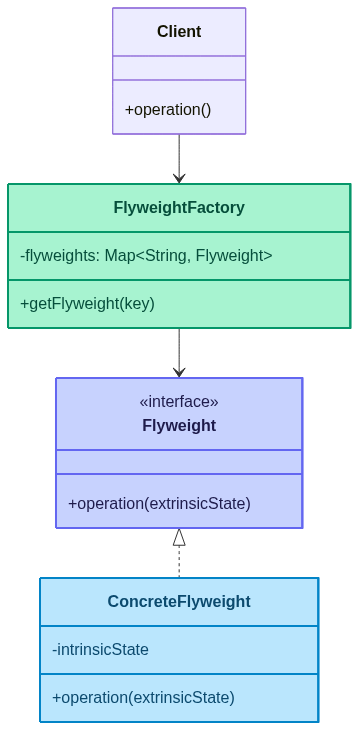
Key Components
Flyweight: Interface for shared objects
ConcreteFlyweight: Stores intrinsic (shared) state
FlyweightFactory: Manages and reuses flyweights
Client: Supplies extrinsic state at runtime
Intrinsic vs Extrinsic State

Real-World Implementation
Example 1: Forest Rendering
import java.util.HashMap;
import java.util.Map;

// Flyweight - TreeType (intrinsic state)
class TreeType {
    private String name;
    private String color;
    private String texture;

    public TreeType(String name, String color, String texture) {
        this.name = name;
        this.color = color;
        this.texture = texture;
    }

    public void draw(int x, int y, int size) {
        System.out.println("Drawing " + name + " tree at (" + x + "," + y + ")" +
                " size=" + size + " color=" + color + " texture=" + texture);
    }
}

// Flyweight Factory
class TreeFactory {
    private static Map<String, TreeType> treeTypes = new HashMap<>();

    public static TreeType getTreeType(String name, String color, String texture) {
        String key = name + "-" + color + "-" + texture;
        treeTypes.putIfAbsent(key, new TreeType(name, color, texture));
        return treeTypes.get(key);
    }
}

// Context - Tree (extrinsic state)
class Tree {
    private int x, y, size;
    private TreeType type;

    public Tree(int x, int y, int size, TreeType type) {
        this.x = x;
        this.y = y;
        this.size = size;
        this.type = type;
    }

    public void draw() {
        type.draw(x, y, size);
    }
}

// Client
public class ForestDemo {
    public static void main(String[] args) {
        TreeType pine = TreeFactory.getTreeType("Pine", "Green", "Rough");
        TreeType oak = TreeFactory.getTreeType("Oak", "Dark Green", "Smooth");

        Tree[] forest = {
            new Tree(10, 20, 5, pine),
            new Tree(15, 30, 6, pine),
            new Tree(50, 60, 8, oak),
            new Tree(70, 80, 7, pine)
        };

        for (Tree tree : forest) {
            tree.draw();
        }
    }
}
Example 2: Text Formatting
import java.util.HashMap;
import java.util.Map;

// Flyweight
class CharacterStyle {
    private String font;
    private int size;
    private boolean bold;

    public CharacterStyle(String font, int size, boolean bold) {
        this.font = font;
        this.size = size;
        this.bold = bold;
    }

    public void render(char c, int x, int y) {
        System.out.println("Rendering '" + c + "' at (" + x + "," + y + ")" +
                " with font=" + font + ", size=" + size + ", bold=" + bold);
    }
}

// Flyweight Factory
class StyleFactory {
    private static Map<String, CharacterStyle> styles = new HashMap<>();

    public static CharacterStyle getStyle(String font, int size, boolean bold) {
        String key = font + "-" + size + "-" + bold;
        styles.putIfAbsent(key, new CharacterStyle(font, size, bold));
        return styles.get(key);
    }
}

// Client
public class TextEditorDemo {
    public static void main(String[] args) {
        String text = "HELLO";
        CharacterStyle style = StyleFactory.getStyle("Arial", 12, true);

        for (int i = 0; i < text.length(); i++) {
            style.render(text.charAt(i), i * 10, 50);
        }
    }
}
Workflow Diagram

Real-World Use Cases
Text Rendering: Characters sharing font/style objects
Game Development: Trees, particles, bullets with shared assets
UI Components: Reusing icons, themes, and styles
Caching Systems: Shared instances for repeated data
Networking: Pooling frequently used protocol objects
When to Use the Flyweight Pattern
✅ Use When
Huge Number of Objects: You create many similar objects
Memory Constraints: RAM usage becomes a bottleneck
Shared State: Many objects share common data
Immutable Data: Intrinsic state doesn’t change
Performance Optimization: Reduce memory footprint
❌ Avoid When
Few Objects: No memory savings to gain
State Changes Often: Intrinsic state is mutable
Complex Extrinsic State: Passing context becomes messy
Over-Engineering: Adds complexity without benefit
Benefits
Memory Efficiency: Dramatic reduction in memory usage
Performance: Faster creation and reduced GC pressure
Scalability: Handles millions of objects gracefully
Shared Resources: Reuse expensive assets
Drawbacks
Complexity: Separating intrinsic/extrinsic state adds complexity
Thread Safety: Shared objects must be immutable
Context Passing: Clients must manage extrinsic state carefully
Maintenance: Harder to debug shared state issues
Advanced Example: Particle System
import java.util.HashMap;
import java.util.Map;

// Flyweight
class ParticleType {
    private String sprite;
    private String color;

    public ParticleType(String sprite, String color) {
        this.sprite = sprite;
        this.color = color;
    }

    public void draw(int x, int y, int velocity) {
        System.out.println("Drawing particle " + sprite + " color=" + color +
                " at (" + x + "," + y + ") with velocity=" + velocity);
    }
}

// Factory
class ParticleFactory {
    private static Map<String, ParticleType> particles = new HashMap<>();

    public static ParticleType getParticle(String sprite, String color) {
        String key = sprite + "-" + color;
        particles.putIfAbsent(key, new ParticleType(sprite, color));
        return particles.get(key);
    }
}

// Client
public class ParticleSystemDemo {
    public static void main(String[] args) {
        for (int i = 0; i < 1000; i++) {
            ParticleType particle = ParticleFactory.getParticle("Spark", "Blue");
            particle.draw(i, i * 2, 10);
        }
    }
}
Flyweight vs Prototype

Best Practices
Make Flyweights Immutable: Avoid shared state changes
Use Factories: Always retrieve flyweights through a factory
Cache Wisely: Use eviction if flyweights grow too many
Document Extrinsic State: Clearly define what is shared vs external
Measure Before/After: Validate memory savings
Thread Safety: Ensure shared objects are safe for concurrent use
Conclusion
The Flyweight Pattern is your memory-saving powerhouse when handling massive numbers of similar objects. It keeps shared data centralized while letting each object maintain its own context, delivering high performance with low memory usage.
Remember: Share the heavy stuff, keep the light stuff outside! 🪶

🎯 Key Takeaway
The Flyweight Pattern is about sharing common data to save memory. When you have millions of similar objects, let the flyweights carry the heavy load.
Flyweight walked into a heap and said, “Relax, I’m just one instance.”
The GC replied, “One instance? You’re shared by 10,000 objects.”
The Flyweight smirked, “Exactly. I’m basically RAM’s influencer.🪶😄
Happy Optimizing! 🪶✨


