

Memento Pattern

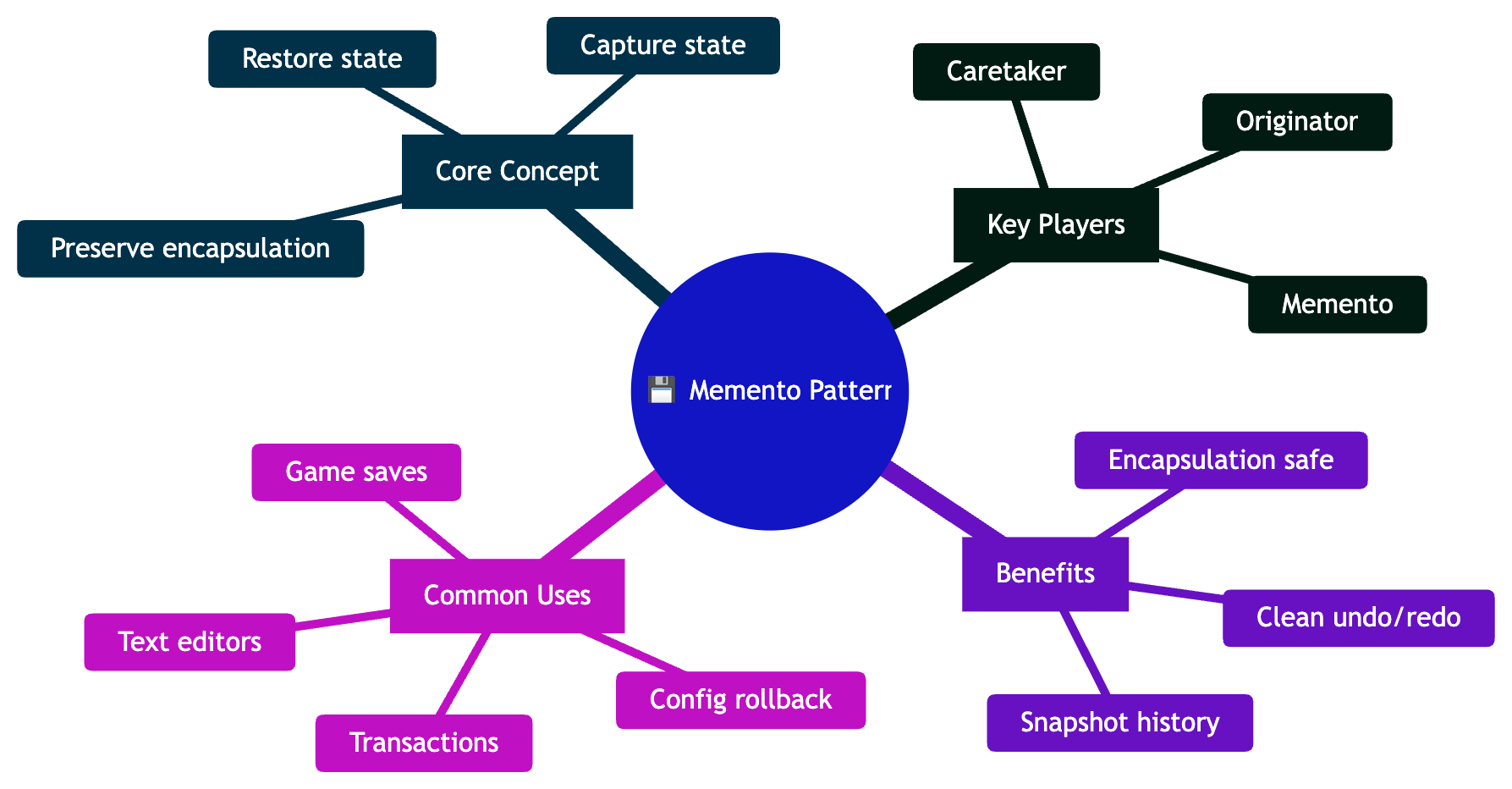
The Memento Pattern is a behavioral design pattern that lets you capture an object's internal state and restore it later—without violating encapsulation. It's the pattern behind every "Ctrl+Z" you've ever pressed.
Think of a video game save point. You play ahead, things go wrong, you reload your save. You don't know exactly how the game stored your state—you just know you can restore it. That's the Memento Pattern.
The Problem
Imagine you're building a text editor with undo functionality. Without the Memento Pattern, implementing undo is messy:
// Without Memento Pattern - broken encapsulation
class TextEditor {
    private String content;
    private int cursorPosition;
    private String fontStyle;

    // To support undo, we expose internal state publicly
    public String getContent() { return content; }
    public int getCursorPosition() { return cursorPosition; }
    public String getFontStyle() { return fontStyle; }

    // Now the undo manager must know ALL internal details!
    public void restore(String content, int cursorPosition, String fontStyle) {
        this.content = content;
        this.cursorPosition = cursorPosition;
        this.fontStyle = fontStyle;
    }
}

class UndoManager {
    // Stores raw fields - tightly coupled to TextEditor internals!
    private List<String> contentHistory = new ArrayList<>();
    private List<Integer> cursorHistory = new ArrayList<>();
    private List<String> fontHistory = new ArrayList<>();
}
Problems:
Broken encapsulation: Internal state is publicly exposed just to support undo
Tight coupling: Undo manager knows all internal details of the editor
Fragile design: Adding a new field to the editor means updating the undo manager too
No clean API: Restoring state is a scattered, multi-field operation
The Solution: Memento Pattern
The Memento Pattern introduces a Memento object that captures state privately. Only the originator can read its contents.
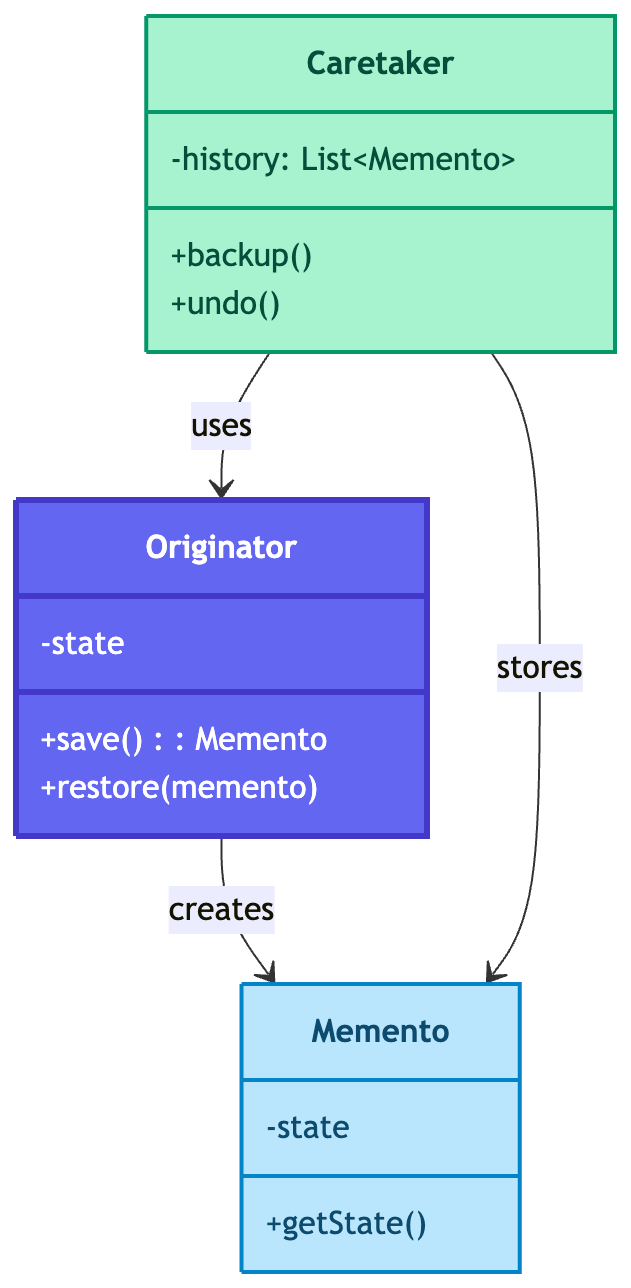
The pattern separates:
Who owns the state (Originator)
Who stores the state (Caretaker)
What the state looks like (Memento — opaque to Caretaker)
How It Solves Each Problem
| Problem | How Memento Pattern Solves It |
|---|---|
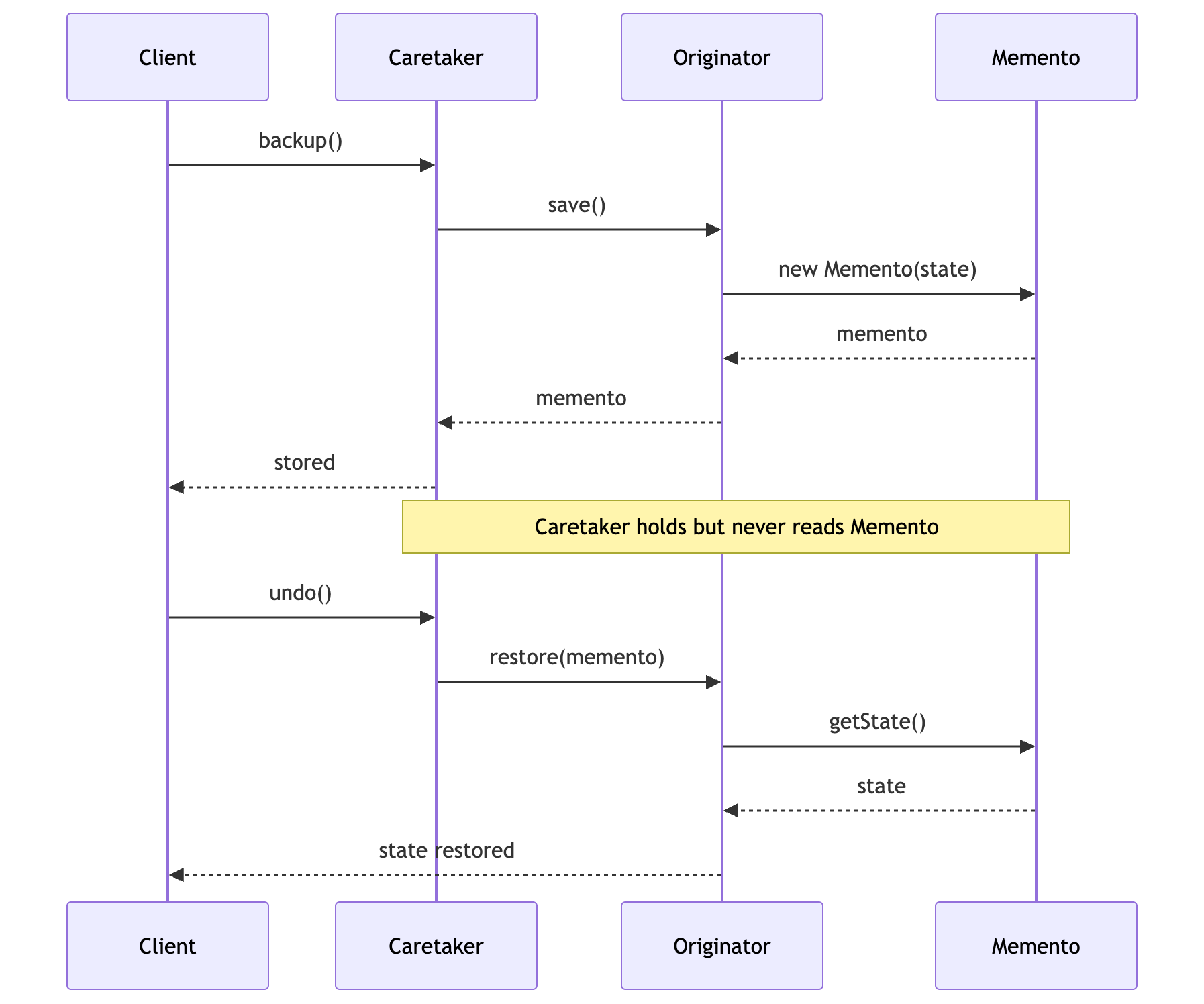
| Broken encapsulation | Memento is created and read only by the Originator—Caretaker stores but never inspects it. |
| Tight coupling | Caretaker holds Mementos without knowing their contents. Adding fields doesn't break it. |
| Fragile design | Internal state changes are isolated inside Originator and Memento only. |
| No clean API | save() and restore() are simple, expressive operations. |
Key Components
Originator: The object whose state needs to be saved and restored
Memento: A snapshot of the Originator's state at a point in time
Caretaker: Manages the history of Mementos; never reads their contents
How It Solves the Problem

Real-World Implementation
Example 1: Text Editor with Undo/Redo
import java.util.Stack;

// Memento
class EditorMemento {
    private final String content;
    private final int cursorPosition;
    private final String fontStyle;

    public EditorMemento(String content, int cursorPosition, String fontStyle) {
        this.content = content;
        this.cursorPosition = cursorPosition;
        this.fontStyle = fontStyle;
    }

    // Only the Originator should call these
    String getContent() { return content; }
    int getCursorPosition() { return cursorPosition; }
    String getFontStyle() { return fontStyle; }
}

// Originator
class TextEditor {
    private String content = "";
    private int cursorPosition = 0;
    private String fontStyle = "Normal";

    public void type(String text) {
        content += text;
        cursorPosition = content.length();
        System.out.println("Typed: \"" + text + "\" -> Content: \"" + content + "\"");
    }

    public void setFontStyle(String style) {
        this.fontStyle = style;
        System.out.println("Font changed to: " + fontStyle);
    }

    public EditorMemento save() {
        System.out.println("State saved.");
        return new EditorMemento(content, cursorPosition, fontStyle);
    }

    public void restore(EditorMemento memento) {
        this.content = memento.getContent();
        this.cursorPosition = memento.getCursorPosition();
        this.fontStyle = memento.getFontStyle();
        System.out.println("Restored -> Content: \"" + content + "\", Font: " + fontStyle);
    }

    public String getContent() { return content; }
}

// Caretaker
class UndoManager {
    private Stack<EditorMemento> undoStack = new Stack<>();
    private Stack<EditorMemento> redoStack = new Stack<>();
    private TextEditor editor;

    public UndoManager(TextEditor editor) {
        this.editor = editor;
    }

    public void backup() {
        undoStack.push(editor.save());
        redoStack.clear();
    }

    public void undo() {
        if (undoStack.isEmpty()) {
            System.out.println("Nothing to undo!");
            return;
        }
        redoStack.push(editor.save());
        System.out.println("--- Undo ---");
        editor.restore(undoStack.pop());
    }

    public void redo() {
        if (redoStack.isEmpty()) {
            System.out.println("Nothing to redo!");
            return;
        }
        undoStack.push(editor.save());
        System.out.println("--- Redo ---");
        editor.restore(redoStack.pop());
    }
}

// Client
public class TextEditorDemo {
    public static void main(String[] args) {
        TextEditor editor = new TextEditor();
        UndoManager history = new UndoManager(editor);

        history.backup();
        editor.type("Hello");

        history.backup();
        editor.type(" World");

        history.backup();
        editor.setFontStyle("Bold");

        System.out.println("\nContent: " + editor.getContent());

        history.undo();
        history.undo();
        history.redo();
    }
}
Example 2: Game Save System
import java.util.ArrayList;
import java.util.List;

// Memento
class GameMemento {
    private final int level;
    private final int health;
    private final int score;
    private final String checkpoint;

    public GameMemento(int level, int health, int score, String checkpoint) {
        this.level = level;
        this.health = health;
        this.score = score;
        this.checkpoint = checkpoint;
    }

    int getLevel() { return level; }
    int getHealth() { return health; }
    int getScore() { return score; }
    String getCheckpoint() { return checkpoint; }
}

// Originator
class GameCharacter {
    private int level;
    private int health;
    private int score;
    private String checkpoint;

    public GameCharacter(int level, int health, int score, String checkpoint) {
        this.level = level;
        this.health = health;
        this.score = score;
        this.checkpoint = checkpoint;
    }

    public void takeDamage(int damage) {
        health = Math.max(0, health - damage);
        System.out.println("Took " + damage + " damage. Health: " + health);
    }

    public void advanceLevel() {
        level++;
        score += 1000;
        checkpoint = "Level " + level + " Start";
        System.out.println("Advanced to level " + level + ". Score: " + score);
    }

    public GameMemento save() {
        System.out.println("Game saved at: " + checkpoint);
        return new GameMemento(level, health, score, checkpoint);
    }

    public void restore(GameMemento memento) {
        this.level = memento.getLevel();
        this.health = memento.getHealth();
        this.score = memento.getScore();
        this.checkpoint = memento.getCheckpoint();
        System.out.println("Loaded save: Level " + level
            + ", Health: " + health + ", Score: " + score);
    }

    @Override
    public String toString() {
        return "GameCharacter{level=" + level + ", health="
            + health + ", score=" + score + ", checkpoint='" + checkpoint + "'}";
    }
}

// Caretaker - Save Slots
class SaveManager {
    private List<GameMemento> saveSlots = new ArrayList<>();

    public void save(GameCharacter character) {
        saveSlots.add(character.save());
    }

    public GameMemento getSave(int slot) {
        if (slot >= 0 && slot < saveSlots.size()) {
            return saveSlots.get(slot);
        }
        throw new IllegalArgumentException("No save in slot " + slot);
    }

    public int saveCount() {
        return saveSlots.size();
    }
}

// Client
public class GameDemo {
    public static void main(String[] args) {
        GameCharacter hero = new GameCharacter(1, 100, 0, "Start");
        SaveManager saves = new SaveManager();

        saves.save(hero);
        hero.advanceLevel();

        saves.save(hero);
        hero.takeDamage(80);
        hero.takeDamage(40);

        System.out.println("\nCharacter died! Loading last save...");
        hero.restore(saves.getSave(1));

        System.out.println("\n" + hero);
    }
}
Example 3: Configuration Manager
import java.util.HashMap;
import java.util.Map;
import java.util.Stack;

// Memento
class ConfigMemento {
    private final Map<String, String> settings;

    public ConfigMemento(Map<String, String> settings) {
        this.settings = new HashMap<>(settings);
    }

    Map<String, String> getSettings() {
        return new HashMap<>(settings);
    }
}

// Originator
class AppConfig {
    private Map<String, String> settings = new HashMap<>();

    public void set(String key, String value) {
        settings.put(key, value);
        System.out.println("Config set: " + key + " = " + value);
    }

    public String get(String key) {
        return settings.getOrDefault(key, "not set");
    }

    public ConfigMemento save() {
        System.out.println("Config snapshot saved.");
        return new ConfigMemento(settings);
    }

    public void restore(ConfigMemento memento) {
        settings = memento.getSettings();
        System.out.println("Config restored: " + settings);
    }
}

// Caretaker
class ConfigHistory {
    private Stack<ConfigMemento> history = new Stack<>();

    public void push(ConfigMemento memento) {
        history.push(memento);
    }

    public ConfigMemento pop() {
        if (history.isEmpty()) {
            throw new RuntimeException("No config history available!");
        }
        return history.pop();
    }

    public boolean hasHistory() {
        return !history.isEmpty();
    }
}

// Client
public class ConfigDemo {
    public static void main(String[] args) {
        AppConfig config = new AppConfig();
        ConfigHistory history = new ConfigHistory();

        config.set("theme", "light");
        config.set("language", "en");
        history.push(config.save());

        config.set("theme", "dark");
        config.set("fontSize", "14px");
        history.push(config.save());

        config.set("theme", "experimental-neon");

        System.out.println("\nTheme before rollback: " + config.get("theme"));

        config.restore(history.pop());
        System.out.println("Theme after rollback: " + config.get("theme"));
    }
}
Workflow Diagram
Real-World Use Cases
Text Editors: Undo/Redo (VS Code, Word, IntelliJ)
Game Development: Save points and game state recovery
Database Transactions: Rollback to a consistent state
Configuration Tools: Revert settings to previous snapshots
Version Control: Conceptually similar to commits
UI Builders: Undo drag-and-drop or property changes
Workflow Engines: Revert completed workflow steps
When to Use the Memento Pattern
✅ Use When
Undo/Redo Needed: You want to restore previous states
Encapsulation is Important: You can't expose internal state publicly
Snapshot History: You need to keep multiple versions of an object
Rollback Support: Transactions or operations that may fail
❌ Avoid When
Memory is Tight: Storing many large snapshots is expensive
State is Huge: Saving full state is impractical
No History Needed: Simple state storage suffices
Benefits
Encapsulation Preserved: Internal state not exposed to Caretaker
Clean Undo/Redo: Simple, expressive save/restore API
Snapshots: Multiple saved states are easy to manage
Originator Independence: Caretaker changes don't affect Originator
Drawbacks
Memory Usage: Many Mementos can consume significant RAM
Serialization Cost: Deep copies of large objects are slow
Caretaker Overhead: Managing Memento lifecycle adds complexity
Memento vs Command Pattern
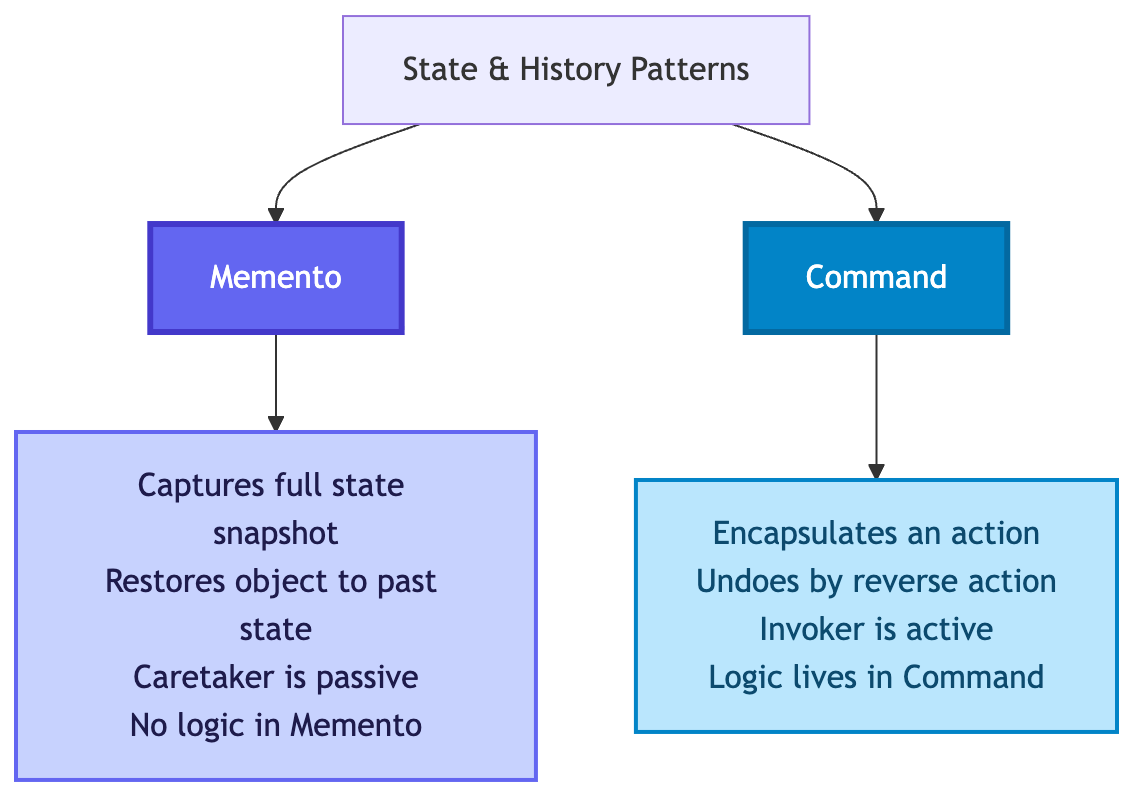
| Aspect | Memento | Command |
|---|---|---|
| Undo Mechanism | Restore full snapshot | Execute reverse operation |
| Memory | Stores full state | Stores action + data |
| Encapsulation | State hidden in Memento | Logic hidden in Command |
| Best For | Arbitrary state rollback | Discrete reversible actions |
Best Practices
Immutable Mementos: Never allow state to change after saving
Limit History Size: Cap undo stack to avoid memory bloat
Shallow vs Deep Copy: Use deep copy for mutable nested objects
Lazy Snapshots: Only save when state actually changes
Compression: For large states, consider delta compression
Interface Segregation: Use a narrow interface for Caretaker access
Conclusion
The Memento Pattern is the backbone of undo/redo everywhere—from your IDE to your favorite game's save system. It captures state cleanly, restores it elegantly, and keeps your internal details where they belong: inside the originator.
Remember: Save early, restore often! 💾
🎯 Key Takeaway
The Memento Pattern is about saving moments without breaking boundaries. When you need undo/redo with encapsulation intact—memento it!
A developer using the Memento Pattern accidentally restored production to last Tuesday. The manager screamed, "We lost a week of data!" The developer smiled, "Relax—I have a Memento from Monday too." 😄
Happy Restoring! 💾✨


