

State Design Pattern

The State Design Pattern is a behavioral design pattern that allows an object to alter its behavior when its internal state changes. The object will appear to change its class, making it seem like the object belongs to a different class altogether.
What is "State" in Software?
In software engineering, state represents the condition or mode of an object at a specific point in time. An object's state is determined by the values of its attributes and influences how the object responds to method calls. For example:
A TCP connection can be in states: Listening, Established, Closed
A media player can be in states: Playing, Paused, Stopped
An order can be in states: New, Paid, Shipped, Delivered, Cancelled
The State pattern is particularly useful when:
An object's behavior depends on its state
The object must change its behavior at runtime depending on that state
Operations have large, multipart conditional statements that depend on the object's state
The Problem: Conditional Chaos
Traditional Approach Without State Pattern
Let's say you're building a media player. Without the State pattern, you might write code like this:
public class MediaPlayer {
    private String state = "STOPPED";

    public void play() {
        if (state.equals("STOPPED")) {
            // Start playing from beginning
            state = "PLAYING";
        } else if (state.equals("PAUSED")) {
            // Resume playing
            state = "PLAYING";
        } else if (state.equals("PLAYING")) {
            // Already playing, do nothing
        }
    }

    public void pause() {
        if (state.equals("PLAYING")) {
            state = "PAUSED";
        } else if (state.equals("STOPPED")) {
            // Can't pause when stopped
        } else if (state.equals("PAUSED")) {
            // Already paused
        }
    }

    public void stop() {
        if (state.equals("PLAYING") || state.equals("PAUSED")) {
            state = "STOPPED";
        }
    }
}
Problems with This Approach
Imagine building a vending machine, document editor, or TCP connection handler. These systems have multiple states, and their behavior changes dramatically based on the current state. Without the State pattern, you'd end up with:
Massive conditional statements (if-else or switch-case) scattered throughout the code
Every method needs to check the current state
As states increase, conditionals grow exponentially
Code becomes unreadable and error-prone
Difficult maintenance as adding new states requires modifying existing code
Adding a new "BUFFERING" state means modifying every method
High risk of introducing bugs in existing functionality
Violates the Open/Closed Principle
Violation of Single Responsibility Principle as one class handles multiple state behaviors
The MediaPlayer class knows about all states and their transitions
Mixing state logic with business logic
Testing becomes complex
Code duplication across different state transitions
Similar state checks repeated in multiple methods
Transition logic scattered across the codebase
Inconsistent state handling
Hidden state transitions
State changes buried inside conditional blocks
Difficult to track which states can transition to which
No clear state machine visualization
Solution: State Design Pattern
Core Concept
The State pattern suggests that you create new classes for all possible states of an object and extract all state-specific behaviors into these classes. Instead of implementing all behaviors on its own, the original object (called context) stores a reference to one of the state objects and delegates all state-related work to that object.
How It Works
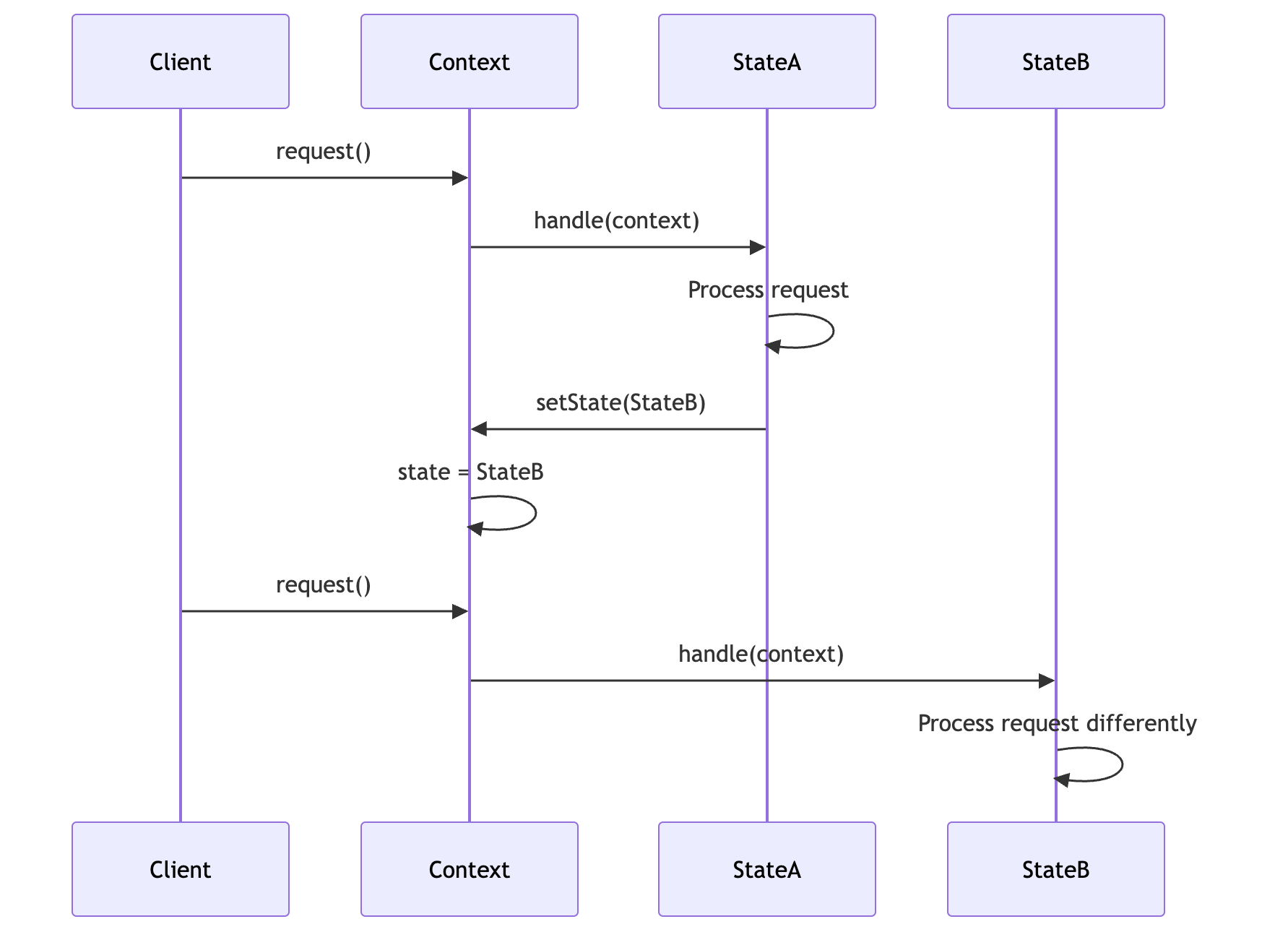
Key Principles
Encapsulation: Each state's behavior is encapsulated in its own class
Delegation: The context delegates state-specific behavior to the current state object
Polymorphism: All state classes implement the same interface, allowing interchangeable use
State Transitions: States can trigger transitions by calling
context.setState(newState)Single Responsibility: Each state class has one responsibility - handling behavior for that specific state
Structure
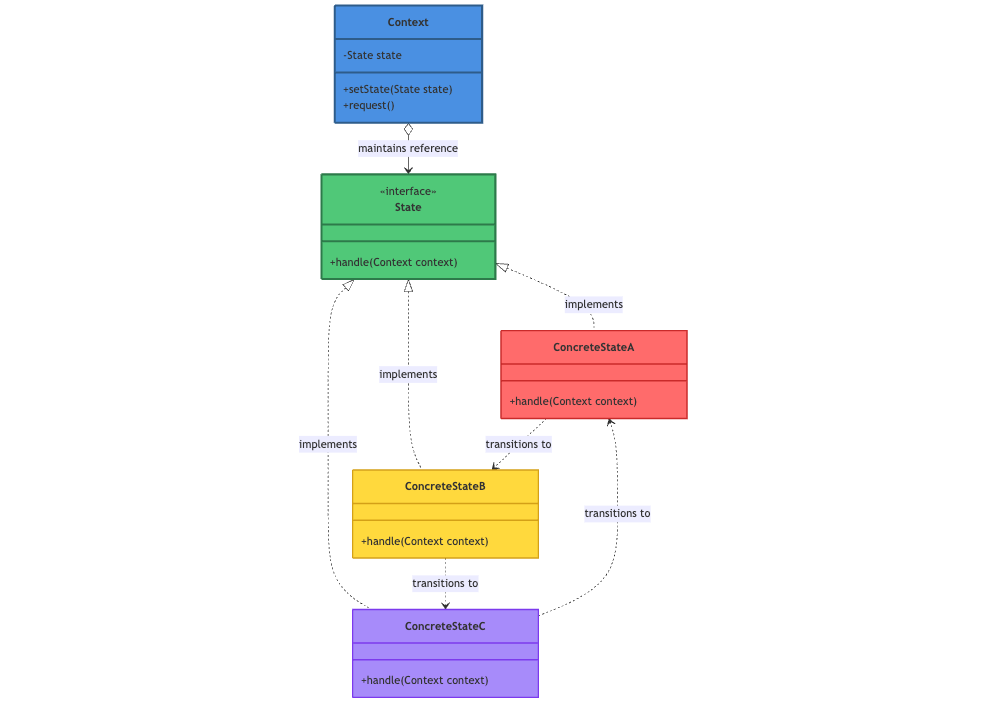
Components Explained
1. Context (The Object with Changing Behavior)
Role: Maintains an instance of a ConcreteState subclass that defines the current state.
Responsibilities:
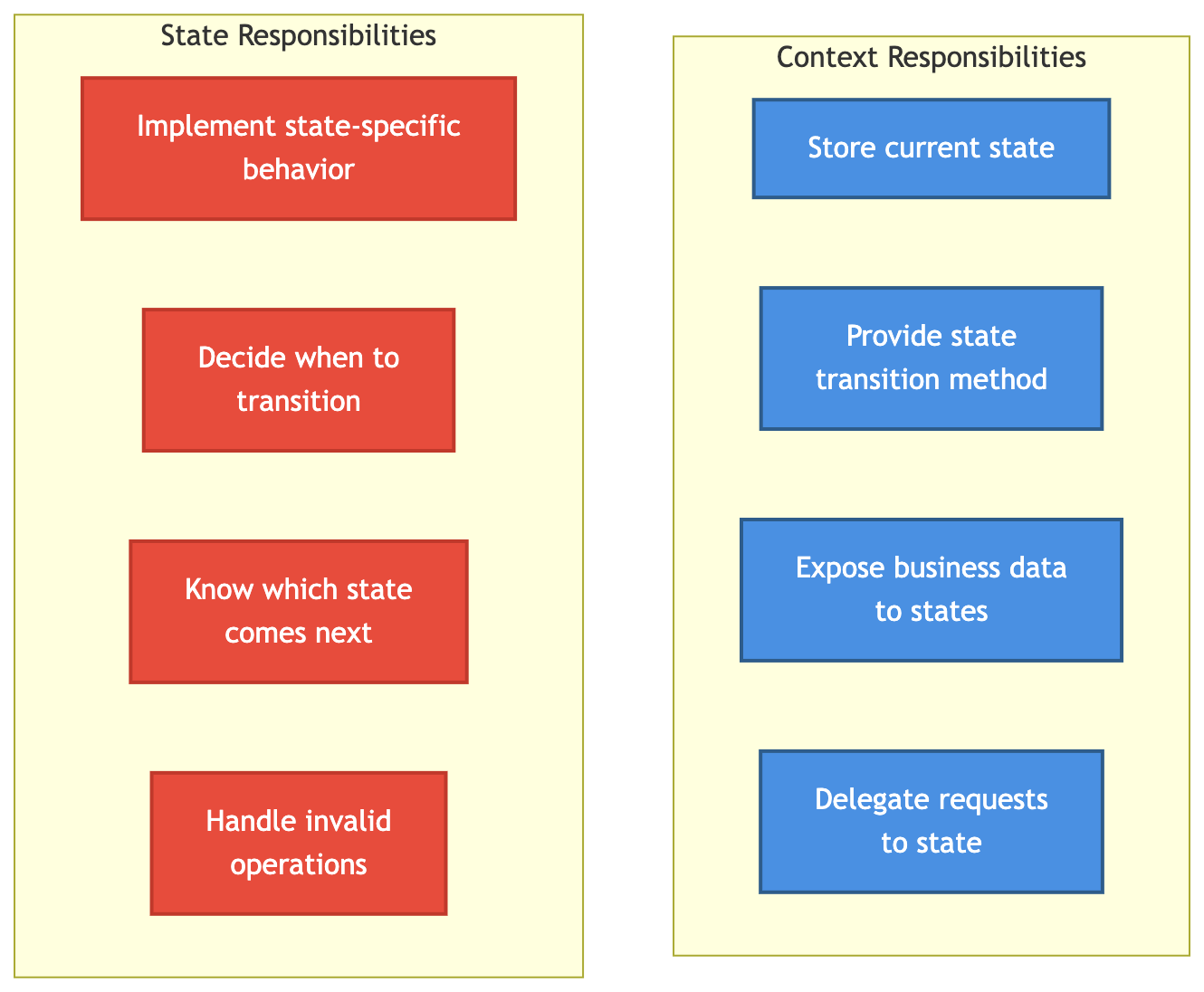
Stores a reference to the current state object
Provides an interface for clients to interact with
Delegates state-specific requests to the current state object
May pass itself to state objects so they can access context data and trigger transitions
Typically unaware of specific state classes (depends only on the State interface)
Example: VendingMachine, Document, TCPConnection
2. State Interface (The Contract)
Role: Defines an interface for encapsulating the behavior associated with a particular state of the Context.
Responsibilities:
Declares methods that all concrete states must implement
Each method typically corresponds to a user action or event
Methods often receive the context as a parameter to access its data or trigger transitions
Example: Methods like insertCoin(), ejectCoin(), selectProduct(), dispense()
3. ConcreteState Classes (The Actual States)
Role: Each subclass implements behavior associated with a specific state of the Context.
Responsibilities:
Implements state-specific behavior for each method in the State interface
Can access the context to read data or trigger state transitions
Decides when and how to transition to other states
May store state-specific data if needed
Example: NoCoinState, HasCoinState, DispensingState, OutOfStockState
The Magic: How State Transitions Work
State transitions can happen in two ways:
State-Driven Transitions (Recommended)
The state object itself decides when to transition
State calls
context.setState(newState)after processingEncapsulates transition logic within the state
Example: After dispensing, DispensingState transitions to NoCoinState
Context-Driven Transitions
The context decides which state to transition to
Context changes state based on return values or conditions
Less encapsulated but sometimes simpler
Example: Context checks conditions and sets appropriate state
Real-World Example: Vending Machine
Let's implement a vending machine that has different states: No Coin, Has Coin, Dispensing, and Out of Stock.
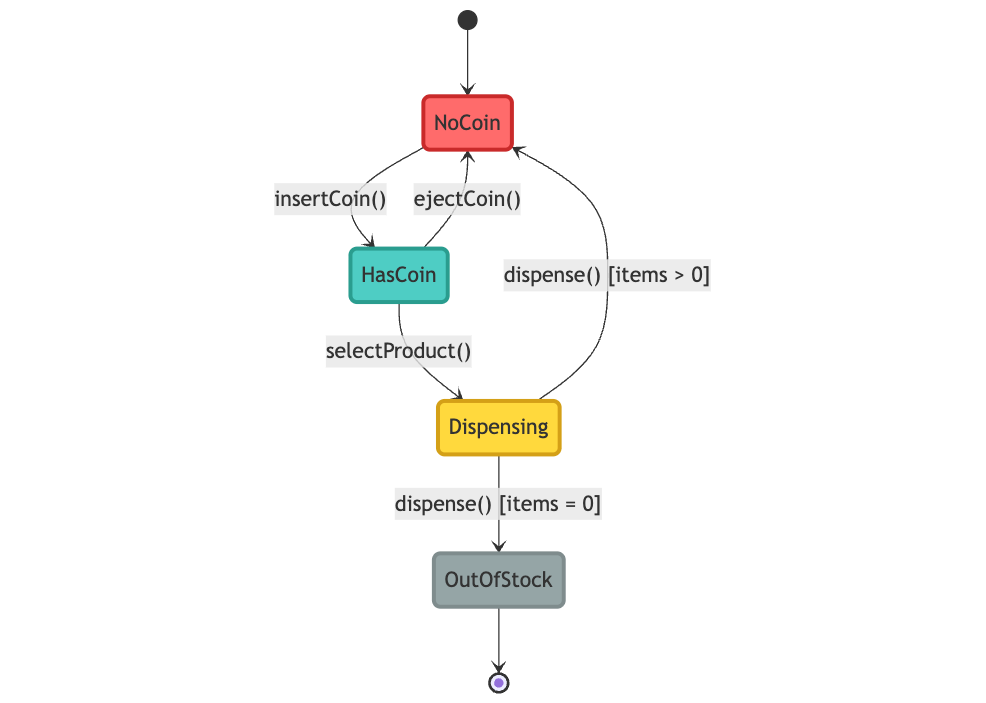
stateDiagram-v2
    [*] --> NoCoin
    NoCoin --> HasCoin : insertCoin()
    HasCoin --> NoCoin : ejectCoin()
    HasCoin --> Dispensing : selectProduct()
    Dispensing --> NoCoin : dispense() [items > 0]
    Dispensing --> OutOfStock : dispense() [items = 0]
    OutOfStock --> [*]

    style NoCoin fill:#FF6B6B,stroke:#C92A2A,stroke-width:3px,color:#fff
    style HasCoin fill:#4ECDC4,stroke:#2A9D8F,stroke-width:3px,color:#fff
    style Dispensing fill:#FFD93D,stroke:#D4A017,stroke-width:3px,color:#000
    style OutOfStock fill:#95A5A6,stroke:#7F8C8D,stroke-width:3px,color:#fff
Step 1: Define the State Interface
/**
 * State interface that defines all possible actions
 * that can be performed in different states
 */
public interface VendingMachineState {

    //Handle coin insertion
    void insertCoin(VendingMachine machine);

    //Handle coin ejection
    void ejectCoin(VendingMachine machine);

    //Handle product selection
    void selectProduct(VendingMachine machine);

    //Handle product dispensing

    void dispense(VendingMachine machine);
}
Step 2: Implement Concrete States
//NoCoinState: Initial state when no coin is inserted
public class NoCoinState implements VendingMachineState {

    @Override
    public void insertCoin(VendingMachine machine) {
        System.out.println("Coin inserted. You can now select a product.");
        machine.setState(machine.getHasCoinState());
    }

    @Override
    public void ejectCoin(VendingMachine machine) {
        System.out.println("No coin to eject.");
    }

    @Override
    public void selectProduct(VendingMachine machine) {
        System.out.println("Please insert a coin first.");
    }

    @Override
    public void dispense(VendingMachine machine) {
        System.out.println("Please insert a coin and select a product.");
    }
}
//HasCoinState: State when coin is inserted but product not selected
public class HasCoinState implements VendingMachineState {

    @Override
    public void insertCoin(VendingMachine machine) {
        System.out.println("Coin already inserted. Please select a product.");
    }

    @Override
    public void ejectCoin(VendingMachine machine) {
        System.out.println("Coin ejected. Please take your coin.");
        machine.setState(machine.getNoCoinState());
    }

    @Override
    public void selectProduct(VendingMachine machine) {
        System.out.println("Product selected. Dispensing...");
        machine.setState(machine.getDispensingState());
    }

    @Override
    public void dispense(VendingMachine machine) {
        System.out.println("Please select a product first.");
    }
}
//DispensingState: State when product is being dispensed
public class DispensingState implements VendingMachineState {

    @Override
    public void insertCoin(VendingMachine machine) {
        System.out.println("Please wait, already dispensing a product.");
    }

    @Override
    public void ejectCoin(VendingMachine machine) {
        System.out.println("Cannot eject coin, product is being dispensed.");
    }

    @Override
    public void selectProduct(VendingMachine machine) {
        System.out.println("Already dispensing a product.");
    }

    @Override
    public void dispense(VendingMachine machine) {
        // Dispense the product
        System.out.println("Product dispensed. Please collect your item.");

        // Decrease item count
        machine.decreaseItemCount();

        // Check if items are still available
        if (machine.getItemCount() > 0) {
            machine.setState(machine.getNoCoinState());
        } else {
            System.out.println("Machine is out of stock.");
            machine.setState(machine.getOutOfStockState());
        }
    }
}
// OutOfStockState: State when machine has no items left
public class OutOfStockState implements VendingMachineState {

    @Override
    public void insertCoin(VendingMachine machine) {
        System.out.println("Machine is out of stock. Cannot accept coins.");
    }

    @Override
    public void ejectCoin(VendingMachine machine) {
        System.out.println("No coin to eject.");
    }

    @Override
    public void selectProduct(VendingMachine machine) {
        System.out.println("Machine is out of stock.");
    }

    @Override
    public void dispense(VendingMachine machine) {
        System.out.println("Machine is out of stock. Cannot dispense.");
    }
}
Step 3: Create the Context (Vending Machine)
// VendingMachine: Context class that maintains current state and delegates operations to the state object
public class VendingMachine {

    // All possible states
    private VendingMachineState noCoinState;
    private VendingMachineState hasCoinState;
    private VendingMachineState dispensingState;
    private VendingMachineState outOfStockState;

    // Current state
    private VendingMachineState currentState;

    // Number of items in machine
    private int itemCount;

    //Constructor initializes all states and sets initial state
    public VendingMachine(int itemCount) {
        this.itemCount = itemCount;

        // Initialize all states
        noCoinState = new NoCoinState();
        hasCoinState = new HasCoinState();
        dispensingState = new DispensingState();
        outOfStockState = new OutOfStockState();

        // Set initial state based on item count
        if (itemCount > 0) {
            currentState = noCoinState;
        } else {
            currentState = outOfStockState;
        }
    }

    //Delegate insertCoin to current state
    public void insertCoin() {
        currentState.insertCoin(this);
    }

    //Delegate ejectCoin to current state
    public void ejectCoin() {
        currentState.ejectCoin(this);
    }

    //Delegate selectProduct to current state
    public void selectProduct() {
        currentState.selectProduct(this);
        // If state changed to dispensing, automatically dispense
        if (currentState == dispensingState) {
            currentState.dispense(this);
        }
    }

    //Set the current state
    public void setState(VendingMachineState state) {
        this.currentState = state;
    }

    //Decrease item count after dispensing
    public void decreaseItemCount() {
        if (itemCount > 0) {
            itemCount--;
        }
    }

    // Getters for all states
    public VendingMachineState getNoCoinState() {
        return noCoinState;
    }

    public VendingMachineState getHasCoinState() {
        return hasCoinState;
    }

    public VendingMachineState getDispensingState() {
        return dispensingState;
    }

    public VendingMachineState getOutOfStockState() {
        return outOfStockState;
    }

    public int getItemCount() {
        return itemCount;
    }
}
Step 4: Client Code
//Demo class to test the Vending Machine
public class VendingMachineDemo {

    public static void main(String[] args) {
        // Create a vending machine with 2 items
        VendingMachine machine = new VendingMachine(2);

        System.out.println("=== Vending Machine Demo ===\n");

        // Scenario 1: Normal purchase
        System.out.println("--Scenario 1: Normal Purchase--");
        machine.insertCoin();
        machine.selectProduct();
        System.out.println();

        // Scenario 2: Try to select without coin
        System.out.println("--Scenario 2: Select Without Coin--");
        machine.selectProduct();
        System.out.println();

        // Scenario 3: Insert and eject coin
        System.out.println("--Scenario 3: Insert and Eject Coin--");
        machine.insertCoin();
        machine.ejectCoin();
        System.out.println();

        // Scenario 4: Last item purchase
        System.out.println("--Scenario 4: Last Item Purchase--");
        machine.insertCoin();
        machine.selectProduct();
        System.out.println();

        // Scenario 5: Try to purchase when out of stock
        System.out.println("--Scenario 5: Out of Stock--");
        machine.insertCoin();
        machine.selectProduct();
    }
}
Output
=== Vending Machine Demo ===

--- Scenario 1: Normal Purchase ---
Coin inserted. You can now select a product.
Product selected. Dispensing...
Product dispensed. Please collect your item.

--- Scenario 2: Select Without Coin ---
Please insert a coin first.

--- Scenario 3: Insert and Eject Coin ---
Coin inserted. You can now select a product.
Coin ejected. Please take your coin.

--- Scenario 4: Last Item Purchase ---
Coin inserted. You can now select a product.
Product selected. Dispensing...
Product dispensed. Please collect your item.
Machine is out of stock.

--- Scenario 5: Out of Stock ---
Machine is out of stock. Cannot accept coins.
Machine is out of stock.
Another Example: Document Editor
Let's implement a document editor with different editing modes.
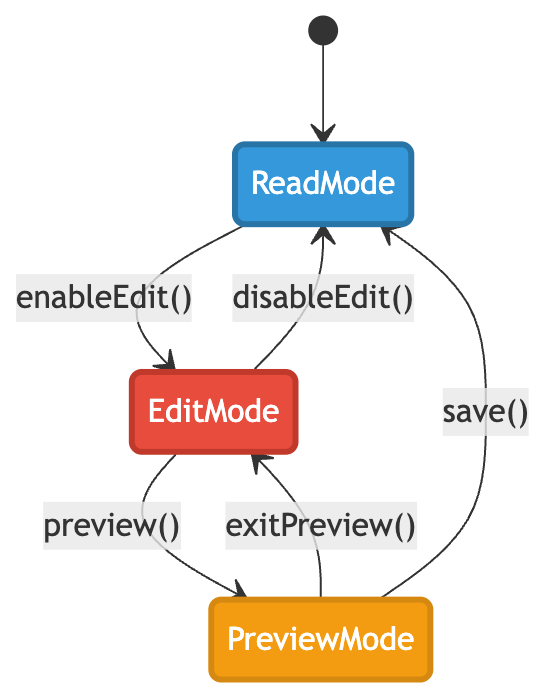
Implementation
// State interface for document operations
public interface DocumentState {
    void edit(Document document, String content);
    void save(Document document);
    void preview(Document document);
}
// ReadMode: Document is in read-only mode
public class ReadMode implements DocumentState {

    @Override
    public void edit(Document document, String content) {
        System.out.println("Switching to Edit Mode...");
        document.setState(new EditMode());
        document.edit(content);
    }

    @Override
    public void save(Document document) {
        System.out.println("Document is already saved in Read Mode.");
    }

    @Override
    public void preview(Document document) {
        System.out.println("Previewing document: " + document.getContent());
    }
}
// EditMode: Document is being edited
public class EditMode implements DocumentState {

    @Override
    public void edit(Document document, String content) {
        System.out.println("Editing document...");
        document.setContent(content);
        System.out.println("Content updated: " + content);
    }

    @Override
    public void save(Document document) {
        System.out.println("Saving document...");
        System.out.println("Document saved successfully!");
        document.setState(new ReadMode());
    }

    @Override
    public void preview(Document document) {
        System.out.println("Entering Preview Mode...");
        document.setState(new PreviewMode());
        document.preview();
    }
}
// PreviewMode: Document is being previewed
public class PreviewMode implements DocumentState {

    @Override
    public void edit(Document document, String content) {
        System.out.println("Cannot edit in Preview Mode. Exiting preview...");
        document.setState(new EditMode());
        document.edit(content);
    }

    @Override
    public void save(Document document) {
        System.out.println("Saving from Preview Mode...");
        System.out.println("Document saved!");
        document.setState(new ReadMode());
    }

    @Override
    public void preview(Document document) {
        System.out.println("=== PREVIEW ===");
        System.out.println(document.getContent());
        System.out.println("===============");
    }
}
// Document: Context class
public class Document {

    private DocumentState state;
    private String content;

    public Document() {
        this.state = new ReadMode();
        this.content = "";
    }

    public void edit(String content) {
        state.edit(this, content);
    }

    public void save() {
        state.save(this);
    }

    public void preview() {
        state.preview(this);
    }

    public void setState(DocumentState state) {
        this.state = state;
    }

    public void setContent(String content) {
        this.content = content;
    }

    public String getContent() {
        return content;
    }
}
Understanding the Pattern: Theory and Mechanics
The State Machine Concept
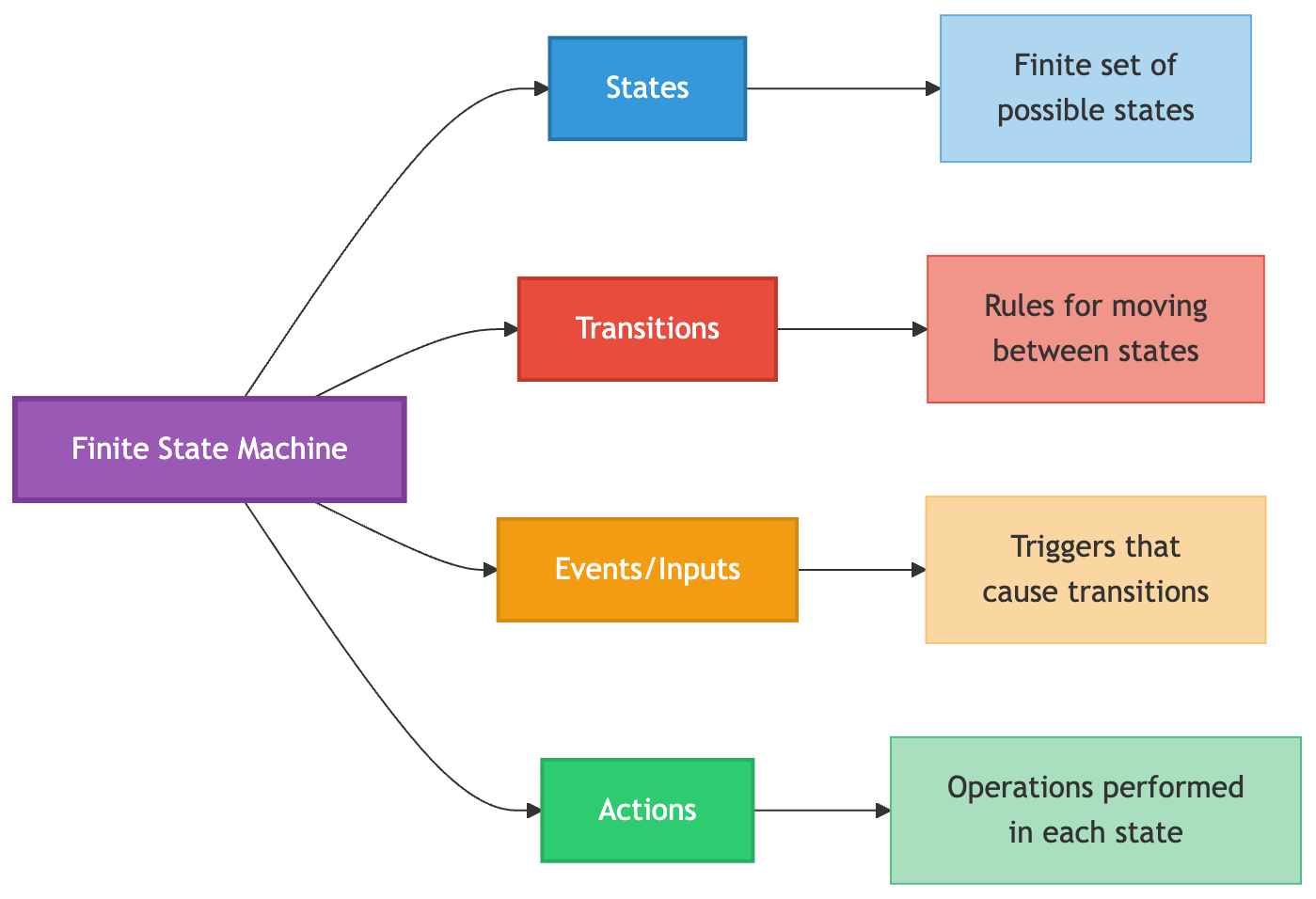
The State Design Pattern is essentially an object-oriented implementation of a Finite State Machine (FSM). A finite state machine is a mathematical model of computation that:
Has a finite number of states
Can be in exactly one state at any given time (the "current state")
Can transition from one state to another in response to inputs or events
Has defined rules for transitions between states
How the Pattern Eliminates Conditionals
Before State Pattern (Procedural approach):
if (currentState == STATE_A) {
    // Behavior for State A
} else if (currentState == STATE_B) {
    // Behavior for State B
} else if (currentState == STATE_C) {
    // Behavior for State C
}
After State Pattern (Object-oriented approach):
currentState.handle(); // Polymorphism handles the branching
The conditional logic is replaced by polymorphism. Each state class implements the same interface, and the correct behavior is automatically selected based on the current state object.
Delegation vs Inheritance
The State pattern uses composition and delegation rather than inheritance:

Why composition is better here:
Runtime flexibility: Can change state at runtime (can't change class at runtime)
Separation of concerns: State logic is separate from context logic
Easier testing: Can test each state independently
No class explosion: Don't need separate context subclasses for each state
State Lifecycle and Memory Management
There are two common approaches to managing state objects:
1. Flyweight Pattern (Shared States)
public class VendingMachine {
    // Create state instances once and reuse them
    private final VendingMachineState noCoinState = new NoCoinState();
    private final VendingMachineState hasCoinState = new HasCoinState();
    private VendingMachineState currentState;

    public VendingMachine() {
        currentState = noCoinState; // Reuse existing instance
    }
}
Advantages: Memory efficient, faster (no object creation)
Requirement: States must be stateless (no instance variables)
2. Create New Instances
public void transitionToNextState() {
    setState(new NextState()); // Create new instance each time
}
Advantages: States can hold state-specific data
Disadvantage: More memory allocation and garbage collection
State vs Context Responsibility
Common Variations
1. State with Entry/Exit Actions
public interface State {
    void onEnter(Context context);  // Called when entering this state
    void handle(Context context);   // Main behavior
    void onExit(Context context);   // Called when leaving this state
}

public class Context {
    public void setState(State newState) {
        if (currentState != null) {
            currentState.onExit(this);
        }
        currentState = newState;
        currentState.onEnter(this);
    }
}
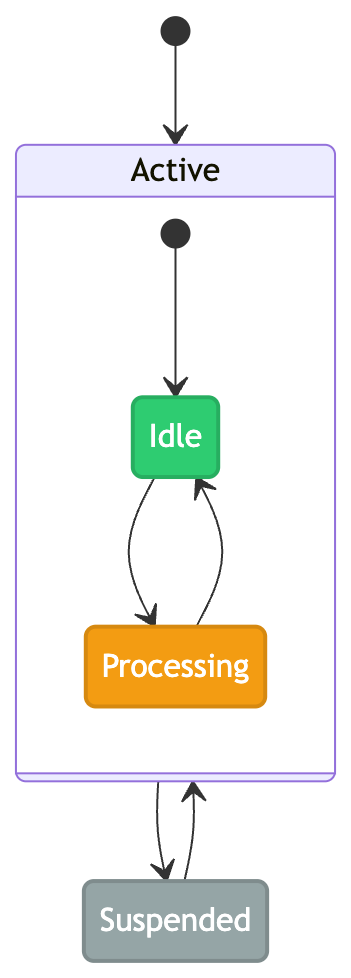
2. Hierarchical States (Nested States)
States can have sub-states, creating a hierarchy:
3. State with History
Keep track of previous states for undo functionality:
public class Context {
    private Stack<State> stateHistory = new Stack<>();
    private State currentState;

    public void setState(State newState) {
        stateHistory.push(currentState);
        currentState = newState;
    }

    public void undo() {
        if (!stateHistory.isEmpty()) {
            currentState = stateHistory.pop();
        }
    }
}
When to Use State Pattern
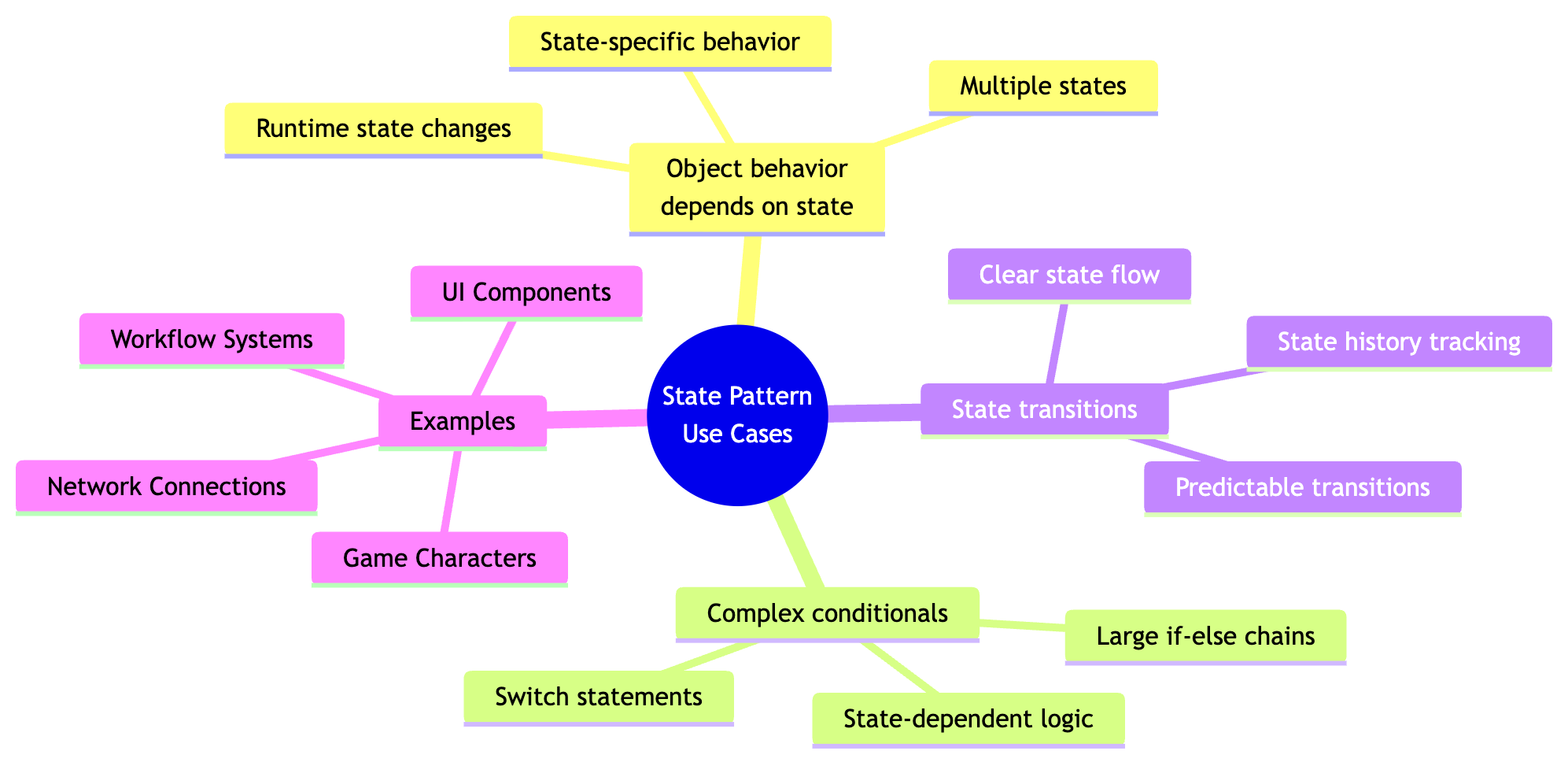
Use State Pattern When
Object behavior depends on its state and must change at runtime
Operations have large conditional statements that depend on object state
State transitions are well-defined and need to be explicit
Multiple states share similar structure but different behavior
Don't Use When
Few states with simple logic - overhead isn't worth it
States rarely change - simpler solutions exist
No clear state transitions - pattern adds unnecessary complexity
Advantages
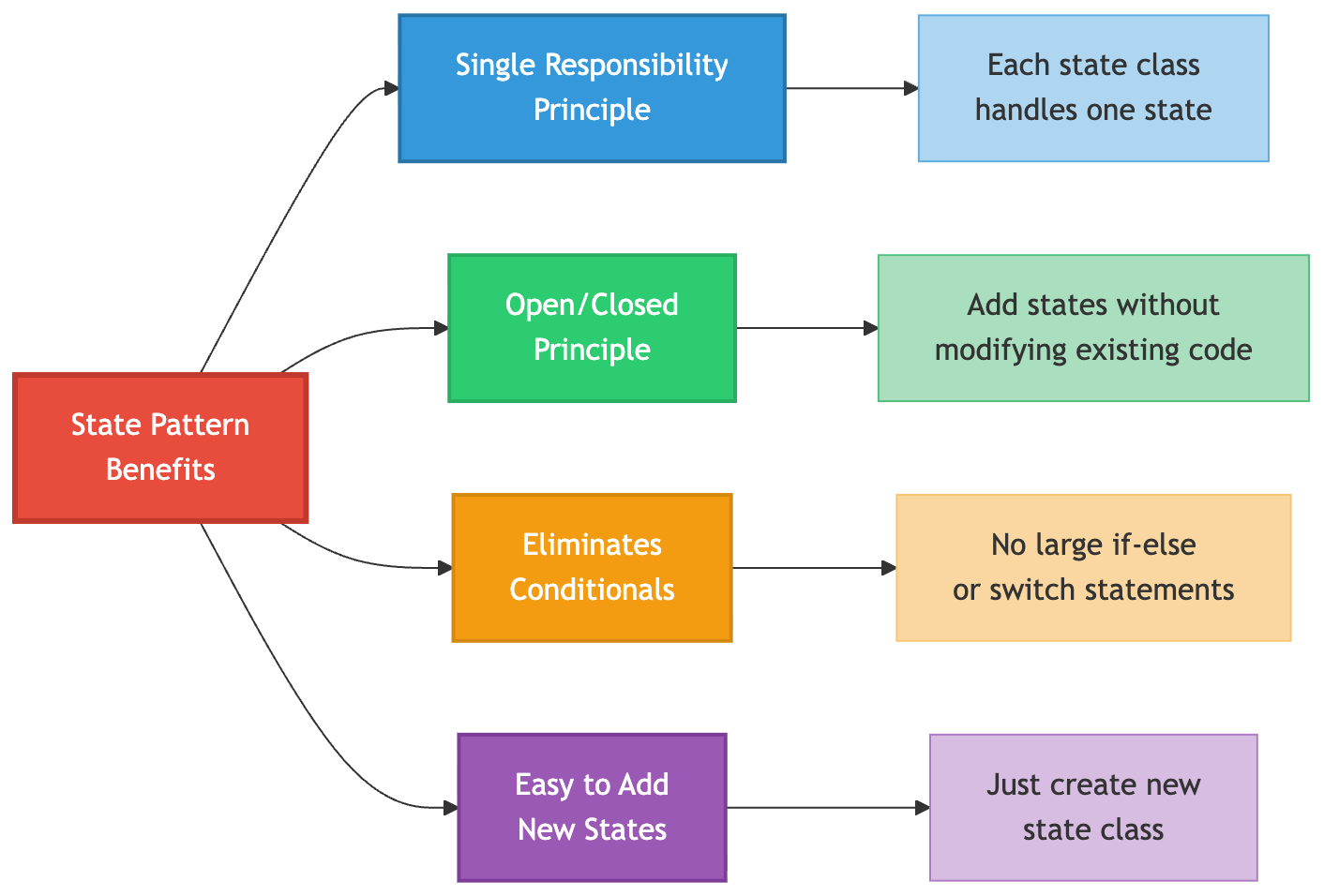
Single Responsibility Principle: Each state class handles behavior for one specific state
Open/Closed Principle: Add new states without modifying existing state classes or context
Cleaner Code: Eliminates complex conditional logic
Easier Maintenance: State-specific code is organized in separate classes
Better Testability: Each state can be tested independently
Disadvantages
Increased Number of Classes: Each state requires a separate class
Overkill for Simple Cases: Too much overhead for objects with few states
State Explosion: Can lead to many classes if there are many states
State vs Strategy Pattern
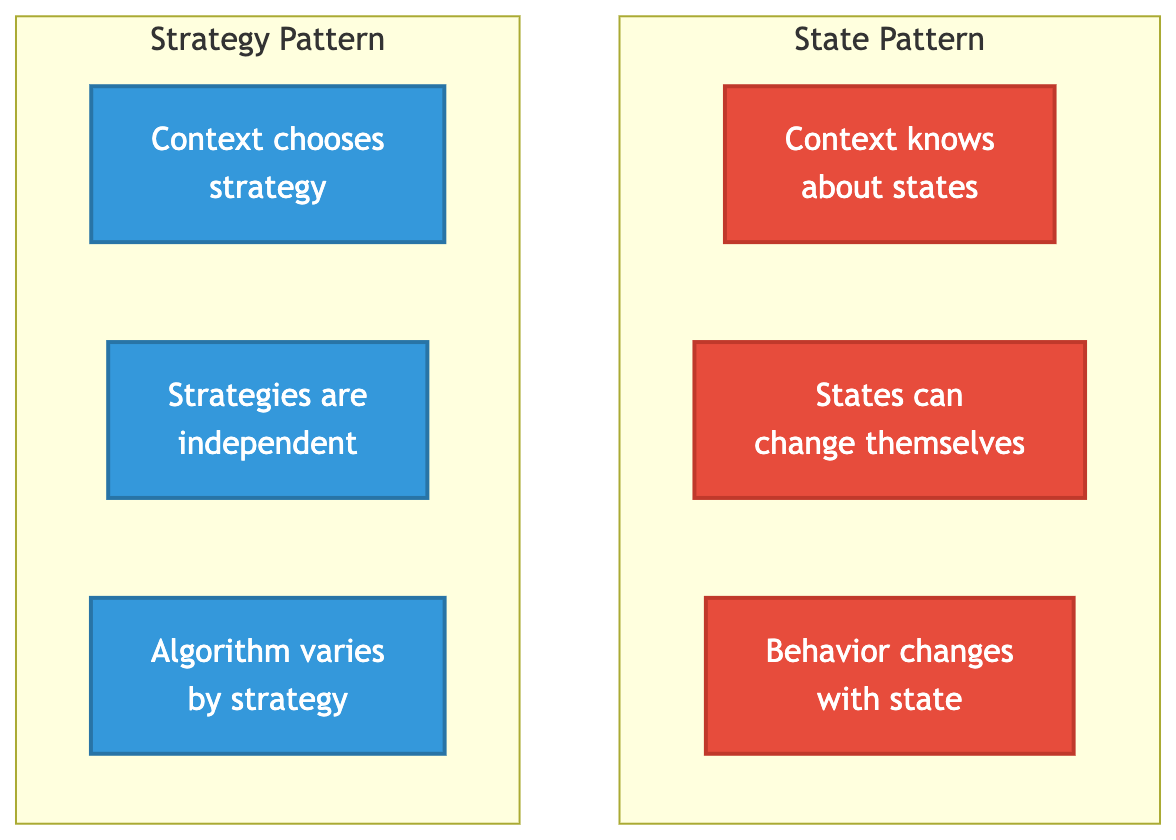
Both patterns have similar structure but different intent:
| Aspect | State Pattern | Strategy Pattern |
|---|---|---|
| Intent | Alter behavior when state changes | Select algorithm at runtime |
| Awareness | States know about each other | Strategies are independent |
| Transition | States can trigger transitions | Client changes strategy |
| Purpose | Manage state-dependent behavior | Encapsulate interchangeable algorithms |
Real-World Applications
The State pattern is widely used in various domains:
1. User Interface Components
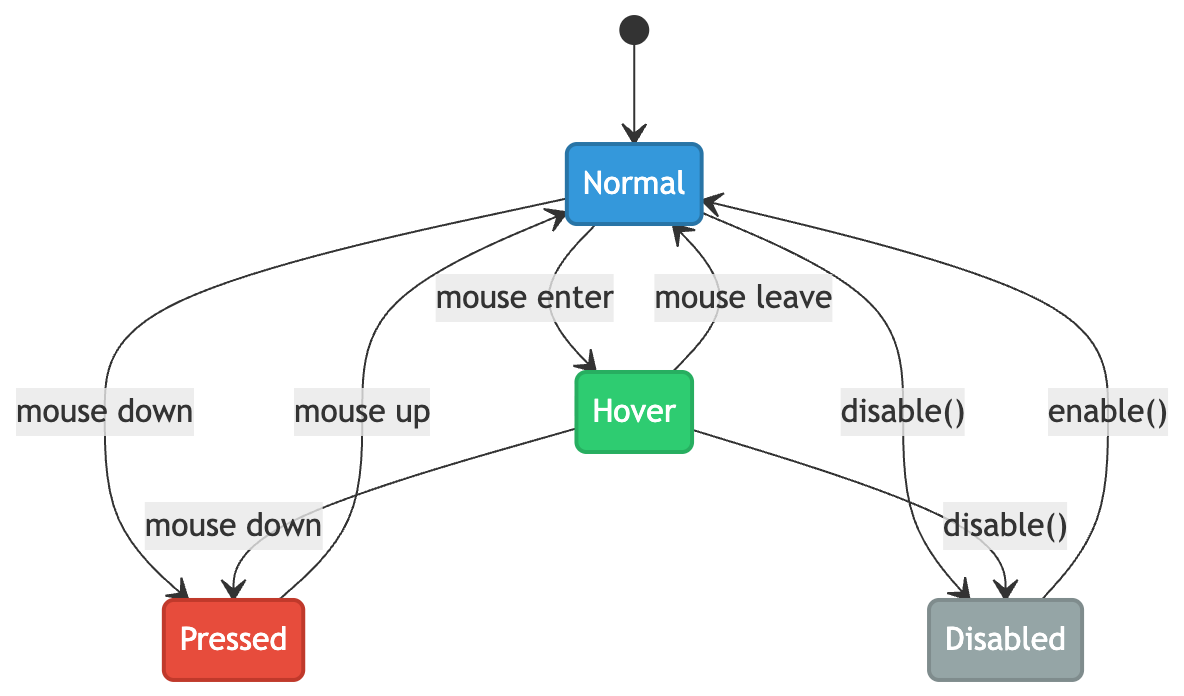
Use Case: Buttons, text fields, and other UI elements that change appearance and behavior based on user interaction.
2. Network Protocols
TCP Connection States: Closed, Listen, SYN-Sent, SYN-Received, Established, FIN-Wait, Close-Wait, etc.
HTTP Request Lifecycle: Idle, Connecting, Sending, Receiving, Complete, Error
3. Game Development
Character States: Idle, Walking, Running, Jumping, Attacking, Defending, Dead
Game States: MainMenu, Playing, Paused, GameOver, Loading
4. Workflow Systems
Order Processing: New → Validated → Paid → Shipped → Delivered → Completed
Document Approval: Draft → Pending Review → Approved → Published / Rejected
5. Media Players
Playback States: Stopped, Playing, Paused, Buffering, Fast-Forward, Rewind
Design Considerations and Best Practices
1. Keep States Immutable
State objects should be stateless or immutable when possible:
// Good: Stateless state object
public class PlayingState implements PlayerState {
    @Override
    public void pause(MediaPlayer player) {
        player.pausePlayback();
        player.setState(player.getPausedState());
    }
}

// Avoid: Stateful state object (unless necessary)
public class PlayingState implements PlayerState {
    private int playbackSpeed; // State-specific data
    // This requires creating new instances instead of reusing
}
2. Use Singleton for States
If states don't maintain data, reuse state instances:
public class MediaPlayer {
    // Singleton state instances
    private static final PlayerState STOPPED_STATE = new StoppedState();
    private static final PlayerState PLAYING_STATE = new PlayingState();
    private static final PlayerState PAUSED_STATE = new PausedState();

    public PlayerState getStoppedState() { return STOPPED_STATE; }
    public PlayerState getPlayingState() { return PLAYING_STATE; }
    public PlayerState getPausedState() { return PAUSED_STATE; }
}
3. Clear Transition Logic
Make state transitions explicit and well-documented:
/**
 * Transitions:
 * - From NoCoin: insertCoin() -> HasCoin
 * - From HasCoin: ejectCoin() -> NoCoin, selectProduct() -> Dispensing
 * - From Dispensing: dispense() -> NoCoin or OutOfStock
 */
public interface VendingMachineState {
    // Methods with clear transition documentation
}
4. Handle Invalid Transitions
Gracefully handle operations not valid in current state:
@Override
public void play(MediaPlayer player) {
    if (player.hasMedia()) {
        // Valid transition
        player.startPlayback();
        player.setState(player.getPlayingState());
    } else {
        // Invalid state - handle gracefully
        System.out.println("No media loaded. Cannot play.");
        // Stay in current state
    }
}
5. Consider State History
Implement undo/redo by maintaining state history if needed:
public class StatefulContext {
    private Deque<State> history = new ArrayDeque<>();
    private State currentState;

    public void setState(State newState) {
        history.push(currentState);
        currentState = newState;
    }

    public void undo() {
        if (!history.isEmpty()) {
            currentState = history.pop();
        }
    }
}
6. Validate State Transitions
Use an enum or validation logic to ensure only valid transitions occur:
public enum StateTransition {
    NO_COIN_TO_HAS_COIN(NoCoinState.class, HasCoinState.class),
    HAS_COIN_TO_DISPENSING(HasCoinState.class, DispensingState.class),
    DISPENSING_TO_NO_COIN(DispensingState.class, NoCoinState.class);

    private final Class<? extends State> from;
    private final Class<? extends State> to;

    // Validation logic
    public static boolean isValidTransition(State from, State to) {
        // Check if transition is allowed
    }
}
7. Logging and Debugging
Add logging to track state transitions:
public void setState(State newState) {
    State oldState = this.currentState;
    this.currentState = newState;

    // Log state transition
    logger.info("State transition: {} -> {}",
                oldState.getClass().getSimpleName(),
                newState.getClass().getSimpleName());
}
8. Testing Strategy
Test each state independently and test state transitions:
@Test
public void testNoCoinStateInsertCoin() {
    VendingMachine machine = new VendingMachine(5);
    machine.setState(new NoCoinState());

    machine.insertCoin();

    assertTrue(machine.getCurrentState() instanceof HasCoinState);
}

@Test
public void testInvalidTransition() {
    VendingMachine machine = new VendingMachine(5);
    machine.setState(new NoCoinState());

    // Should handle gracefully
    machine.selectProduct();

    // Should still be in NoCoinState
    assertTrue(machine.getCurrentState() instanceof NoCoinState);
}
Conclusion
The State Design Pattern is a powerful tool for managing complex state-dependent behavior. It transforms tangled conditional logic into clean, maintainable, and extensible code. While it introduces more classes, the benefits of clarity, maintainability, and adherence to SOLID principles make it invaluable for systems with multiple states and complex state transitions.
Use this pattern when you find yourself writing large conditional statements based on object state, and watch your code transform into an elegant, easy-to-maintain solution.
Key Takeaways:
✅ Encapsulates state-specific behavior in separate classes
✅ Eliminates complex conditional statements
✅ Makes state transitions explicit and manageable
✅ Follows Single Responsibility and Open/Closed principles
✅ Perfect for objects with multiple states and complex behavior changes


