


A deep dive for backend engineers who've seen the lag spike and wondered: "Why did that happen?
What Really Happens Under the Hood?"
If you've ever watched your Kafka consumer lag suddenly jump to thousands — and then slowly drain back down — without any obvious code deployment or broker issue, you've probably witnessed a consumer rebalance. It's one of the most misunderstood operational behaviors in Kafka, and getting it wrong can mean silent data delays, duplicate processing, or even data loss in poorly configured setups.
This post pulls back the curtain on what actually happens at every stage of a rebalance — from the heartbeat that triggers it to the moment your consumers resume work.
1. Consumer Groups and Partition Assignment
Kafka's consumer group model is elegantly simple: multiple consumers share the work of reading from a topic by each taking ownership of a subset of partitions. No two consumers in the same group can read the same partition simultaneously.
The Group Coordinator (a specific broker elected for each group) manages membership and orchestrates assignment. One consumer in the group is elected as the Group Leader — it's responsible for computing the actual partition assignment using the configured partition assignor strategy (RangeAssignor, RoundRobinAssignor, StickyAssignor, etc.) and sending the assignment map back to the coordinator.
Topic: orders (6 partitions)
Consumer Group: orders-processing-group
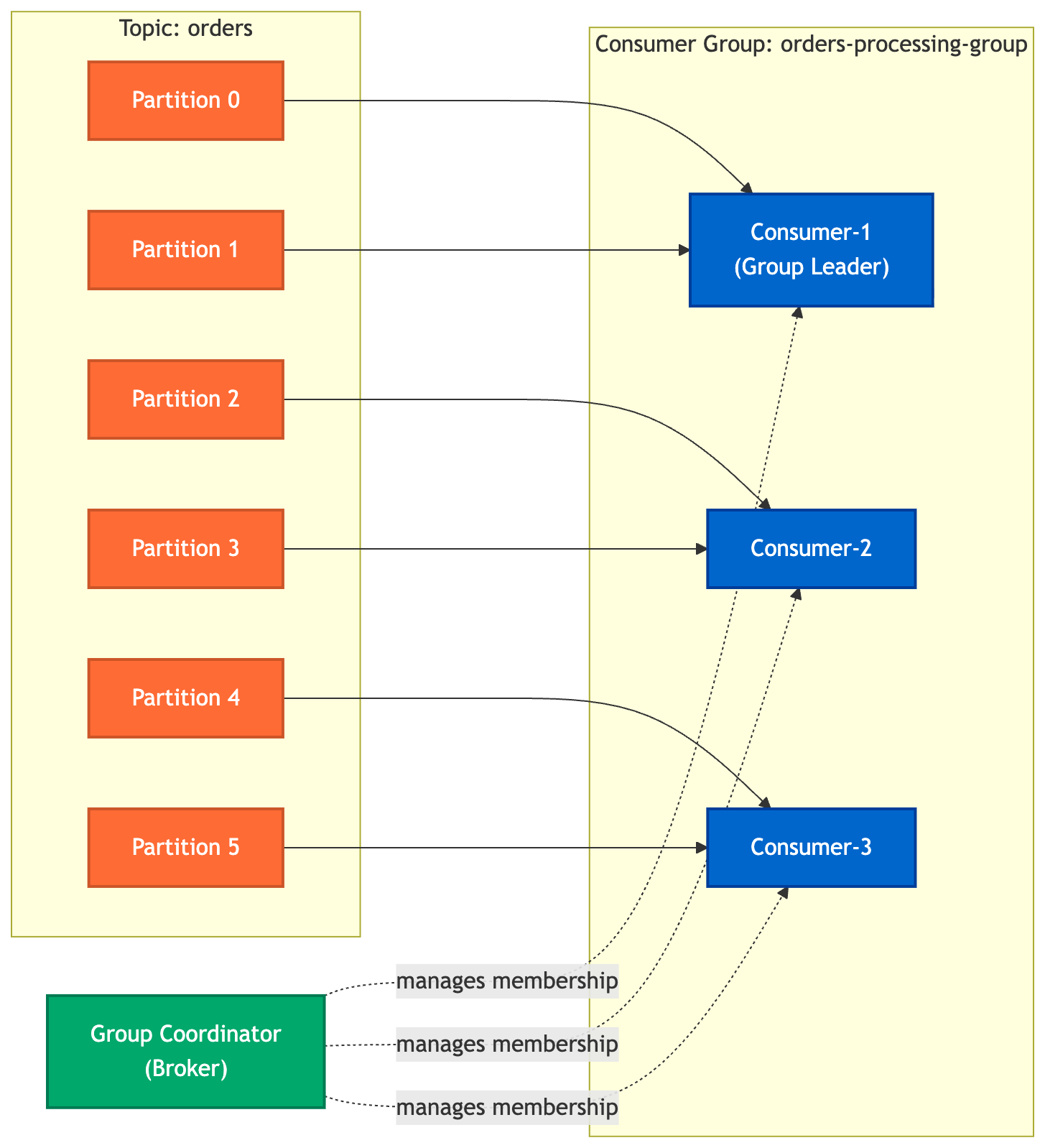
Key players:
Group Coordinator — broker-side component, tracks heartbeats and membership
Group Leader — a consumer instance elected to compute assignments
Partition Assignor — pluggable strategy (Range, RoundRobin, Sticky, CooperativeSticky)
💡 Takeaway: The consumer that happens to join first usually becomes the group leader. It receives the full member metadata from the coordinator and runs the assignor logic locally. This means assignment logic runs on the client side, not the broker.
2. What Triggers a Rebalance
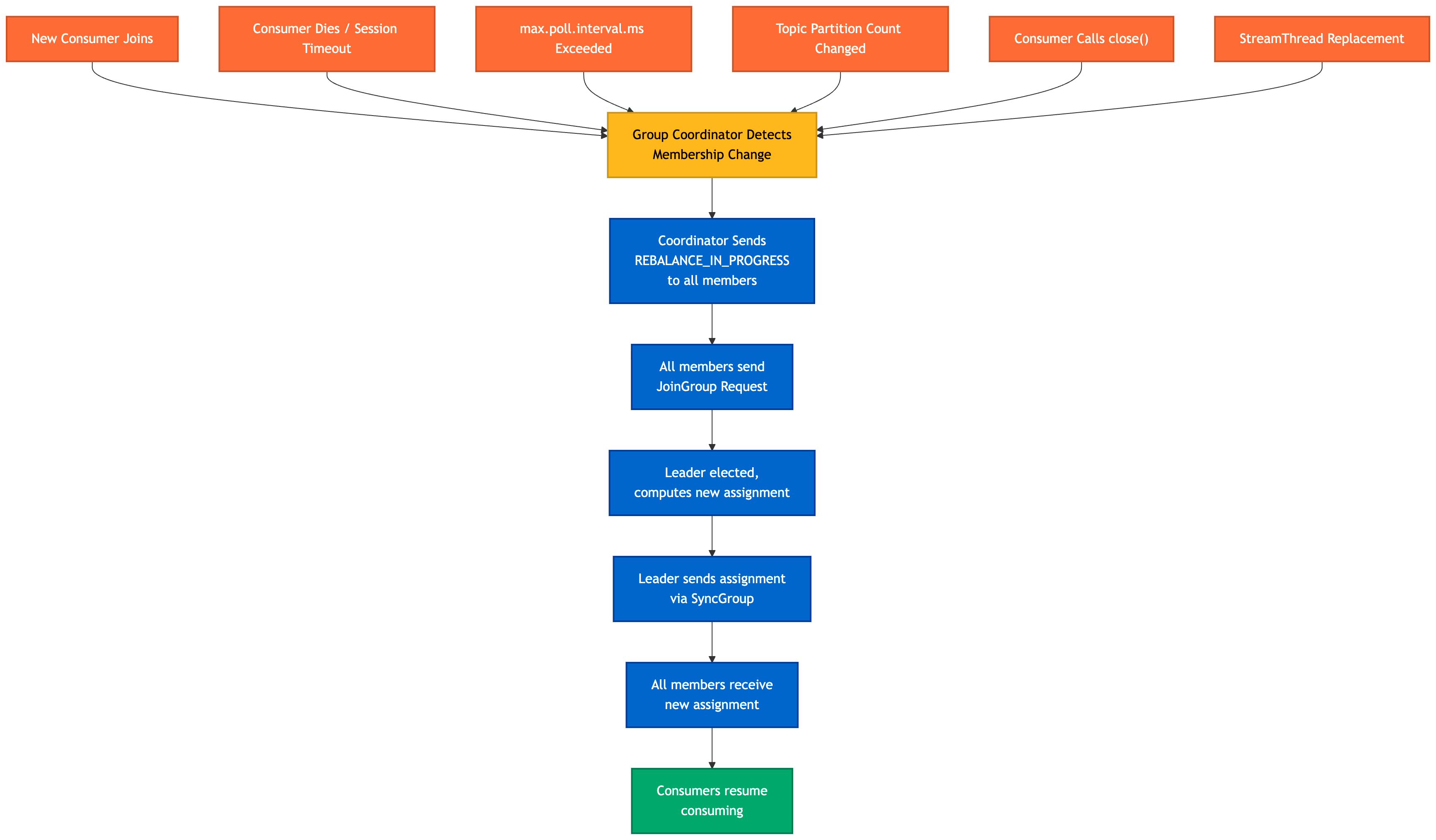
A rebalance is the process by which Kafka redistributes partition ownership across the consumer group. It's triggered whenever the group's membership or the topic's partition count changes.
Common Triggers
| Trigger | Description |
|---|---|
| New consumer joins | A new instance calls subscribe() and connects to the group |
| Consumer leaves (graceful) | A consumer calls close(), sending a LeaveGroup request |
| Session timeout | No heartbeat received from a consumer within session.timeout.ms |
| Poll timeout | Consumer doesn't call poll() within max.poll.interval.ms |
| Topic partition count changes | Admin adds partitions to a subscribed topic |
| Thread crash/replacement | A Kafka Streams StreamThread dies and is replaced |
| Subscription change | Consumer subscribes to a new topic via regex match |
The Heartbeat Mechanism
Consumers send heartbeats on a background thread every heartbeat.interval.ms (default: 3000ms). If the coordinator doesn't receive a heartbeat within session.timeout.ms (default: 45000ms in modern clients), it marks that consumer as dead and triggers a rebalance.
Separately, the main thread must call poll() at least once every max.poll.interval.ms (default: 300000ms = 5 minutes). This catches cases where the consumer is alive (heartbeats sending) but stuck processing records — a common issue with heavy per-record processing.
// Key timeout configs
Properties props = new Properties();
props.put("session.timeout.ms", "45000");        // heartbeat-based liveness
props.put("heartbeat.interval.ms", "3000");       // how often to send heartbeats
props.put("max.poll.interval.ms", "300000");      // max time between poll() calls
props.put("max.poll.records", "500");             // tune to keep poll() intervals short
💡 Takeaway:
session.timeout.mscatches dead consumers (network partition, OOM kill).max.poll.interval.mscatches stuck consumers (long processing loops). They protect against different failure modes — tune both.
3. Eager Rebalancing — Stop the World
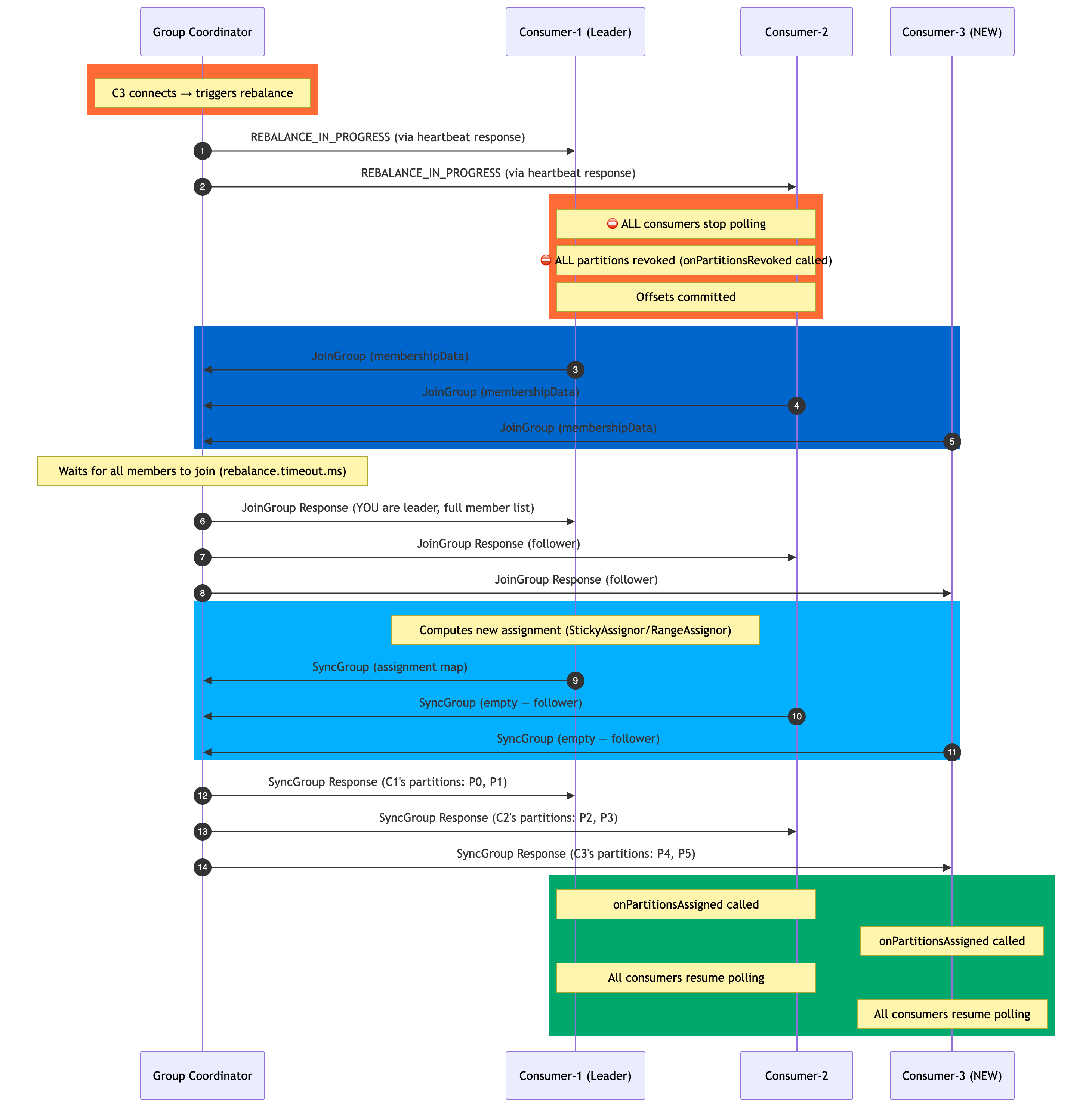
The eager rebalance protocol (the default until Kafka 2.4) is brutal in its simplicity: when a rebalance is triggered, every consumer stops consuming, every partition assignment is revoked, and then partitions are redistributed from scratch. Even consumers that will end up with the exact same partitions must go through this cycle.
The Eager Rebalance Sequence
The Consumption Gap
The critical problem with eager rebalancing is the stop-the-world window — the period between partition revocation and the final assignment. During this time:
No messages are being consumed from any partition
Consumer lag accumulates on all partitions
This gap can last seconds to tens of seconds depending on group size and network conditions
Timeline:

T=0    [C1: P0,P1] [C2: P2,P3] — C3 connects
T=1    ⛔ ALL STOP — revoke all partitions
T=2    JoinGroup phase (network roundtrips)
T=3    Leader computes assignment
T=4    SyncGroup phase
T=5    ✅ [C1: P0,P1] [C2: P2,P3] [C3: P4,P5] — resume

      4-second consumption gap on ALL 4 partitions (P0–P3)
      even though C1 and C2 kept their partitions!
💡 Takeaway: With eager rebalancing, adding a single consumer to a 50-consumer group causes all 50 consumers to stop and restart. The consumption gap scales with group size and rebalance round-trip time.
4. Cooperative / Incremental Rebalancing
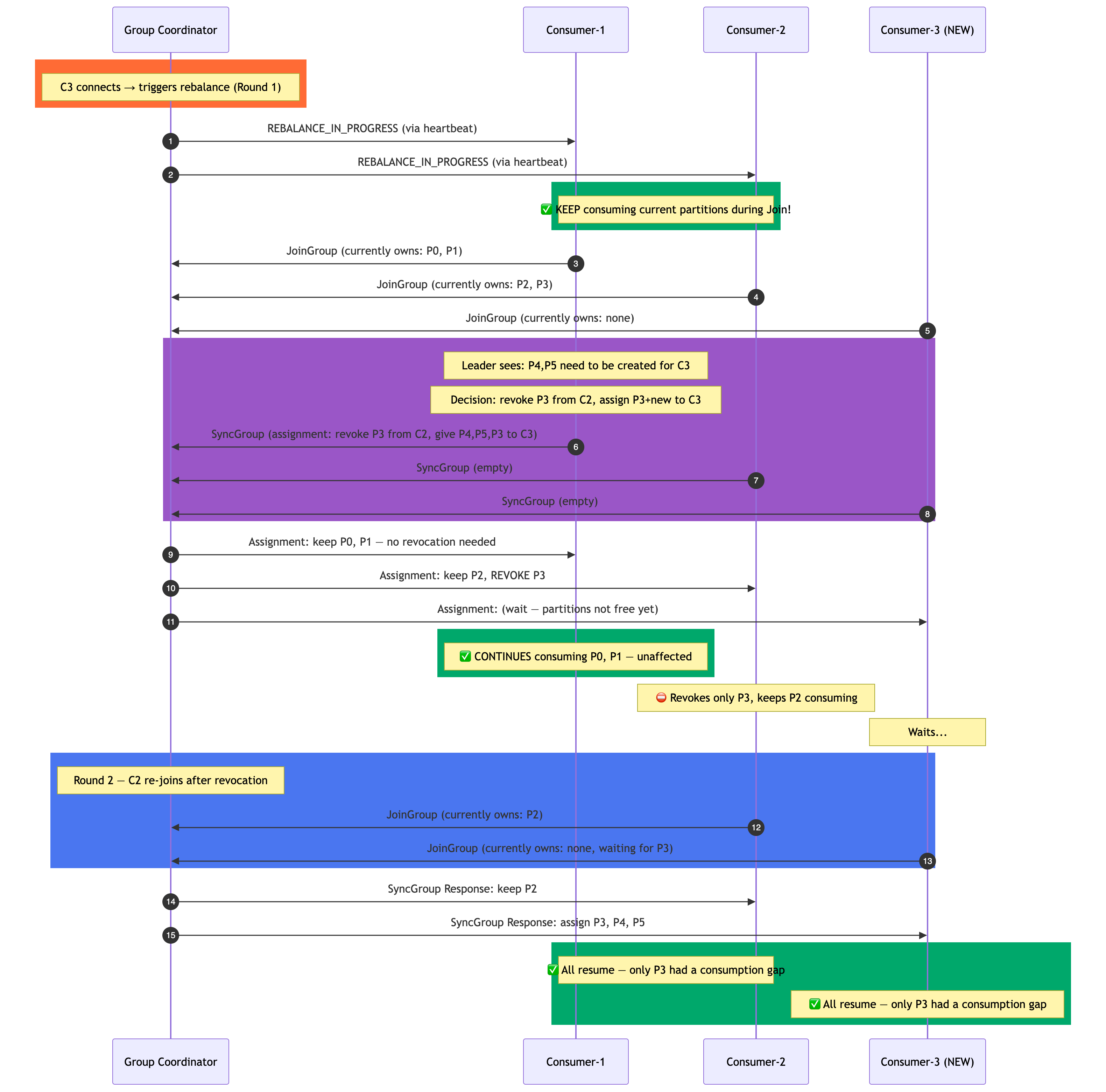
Introduced in Kafka 2.4 (KIP-429), cooperative rebalancing fundamentally changes the contract: instead of revoking all partitions upfront, only the partitions that need to move are revoked, while consumers that keep their partitions continue consuming uninterrupted.
The protocol runs in two rounds:
Round 1 (discovery): Members join and sync to discover which partitions need to move
Round 2 (revocation + reassignment): Only affected consumers revoke their partitions, then a second join/sync reassigns them
The Cooperative Rebalance Sequence
Enabling Cooperative Rebalancing
// Java client
props.put("partition.assignment.strategy",
    "org.apache.kafka.clients.consumer.CooperativeStickyAssignor");

// Or in Spring Kafka
spring.kafka.consumer.properties.partition.assignment.strategy=\
    org.apache.kafka.clients.consumer.CooperativeStickyAssignor
# application.properties (Spring Boot)
spring.kafka.consumer.properties.partition.assignment.strategy=\
    org.apache.kafka.clients.consumer.CooperativeStickyAssignor
Version availability:
CooperativeStickyAssignor— Kafka client 2.4+ (KIP-429)Kafka Streams cooperative rebalancing — Kafka 2.4+ via
StreamsConfig.UPGRADE_FROM_CONFIGDefault assignor changed to
CooperativeStickyAssignor— Kafka 3.1+
⚠️ Migration Note: Switching from
StickyAssignortoCooperativeStickyAssignoron a live consumer group requires a rolling upgrade. SetUPGRADE_FROM_CONFIGor migrate gradually — mixing eager and cooperative assignors in the same group will cause issues.
💡 Takeaway: Cooperative rebalancing dramatically reduces the blast radius. Instead of all partitions going dark, only the minority of partitions that need to move experience a gap. For large consumer groups, this is a massive operational improvement.
5. Kafka Streams vs Plain Kafka Consumer During Rebalancing
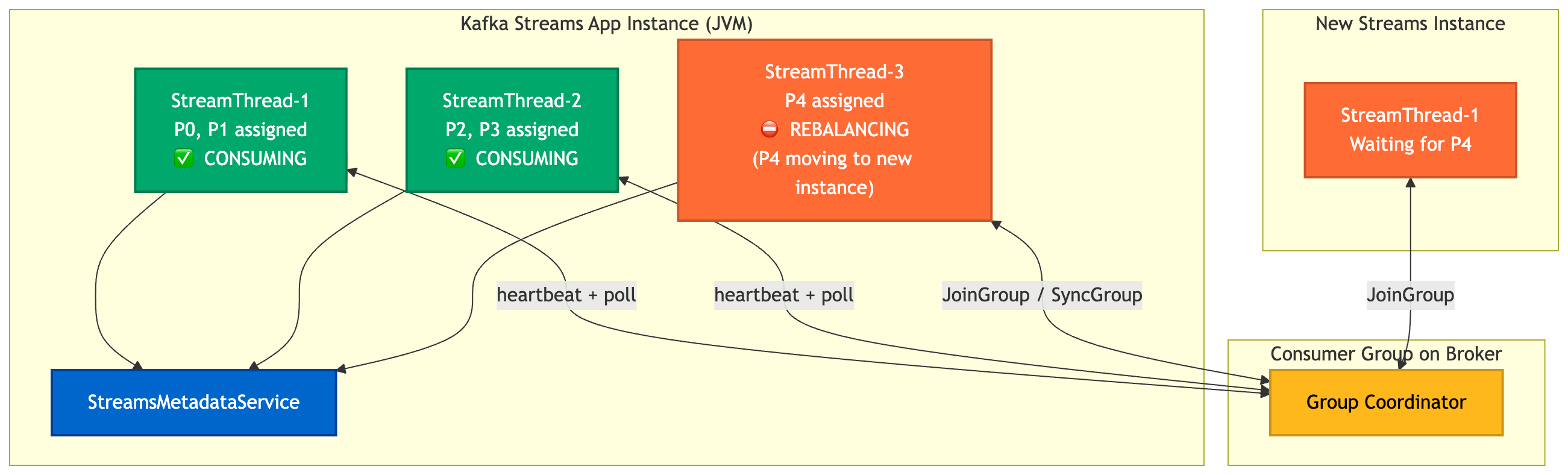
Plain Kafka consumers have one processing loop per instance. Kafka Streams is architecturally different — it manages multiple StreamThread instances within a single JVM process, each running its own consumer in the same consumer group.
How Streams Handles Rebalancing
When a rebalance is triggered in a Kafka Streams application:
Each
StreamThreadis a full member of the consumer groupOnly the threads whose partition assignments change go through revocation
Other
StreamThreadinstances can continue processing uninterrupted (with cooperative rebalancing)
StreamThread Exception Handling
Kafka Streams provides StreamsUncaughtExceptionHandler to control what happens when a StreamThread crashes:
streams.setUncaughtExceptionHandler(exception -> {
    if (exception instanceof SomeTransientException) {
        // Replace just this thread — minimal rebalance impact
        return StreamsUncaughtExceptionHandler.StreamThreadExceptionResponse.REPLACE_THREAD;
    }
    // Shut down the entire Streams instance
    return StreamsUncaughtExceptionHandler.StreamThreadExceptionResponse.SHUTDOWN_CLIENT;
});
REPLACE_THREAD — Starts a new StreamThread to replace the crashed one. This triggers a rebalance within the group, but only for partitions owned by that thread. Other threads keep running. Best for transient errors.
SHUTDOWN_CLIENT — Shuts down the entire Streams application instance. All StreamThread instances stop, all their partitions are revoked, triggering a larger rebalance. Use for unrecoverable errors where continued processing would produce incorrect results.
# Streams config — tune thread count
num.stream.threads=4
💡 Takeaway: In Kafka Streams, the unit of rebalancing granularity is a
StreamThread. With cooperative rebalancing andREPLACE_THREADstrategy, you can survive individual thread failures with minimal disruption to overall throughput.
6. Static Membership
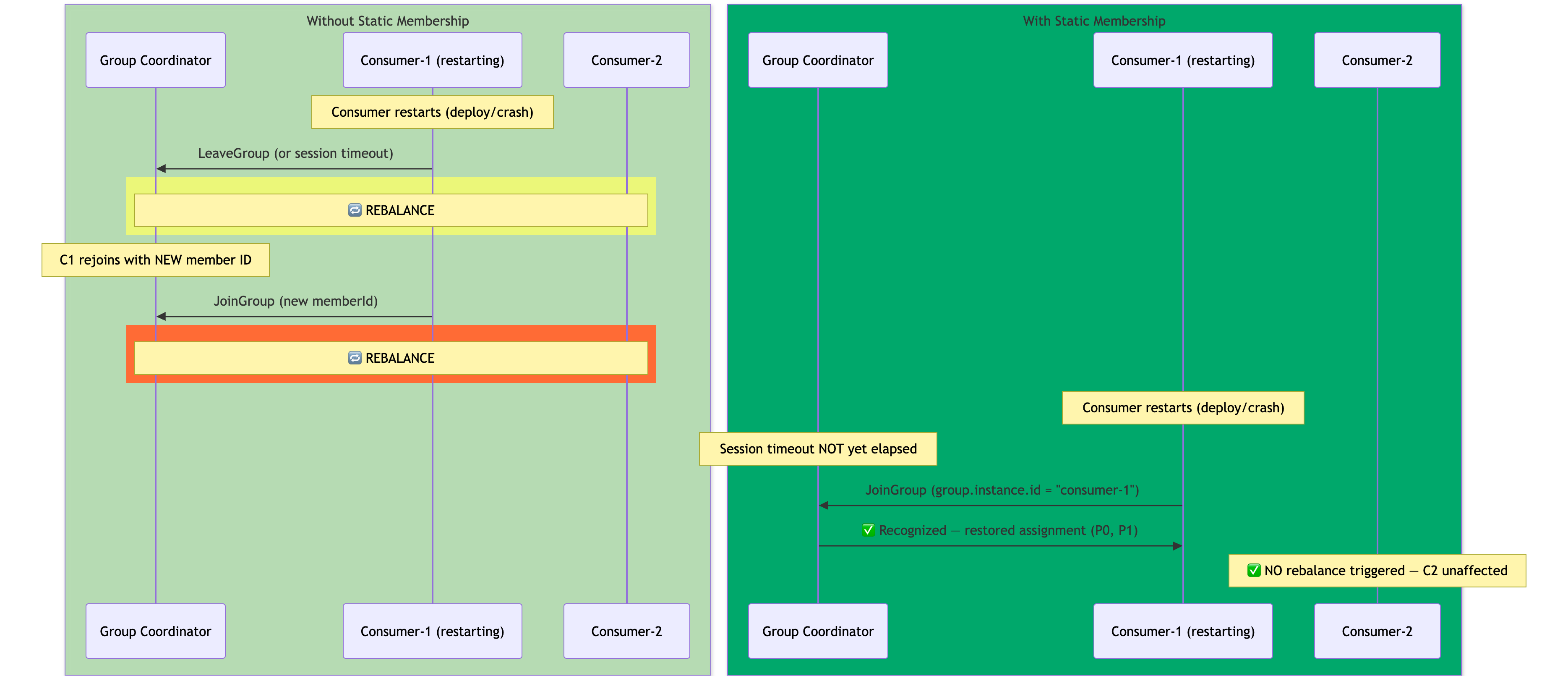
By default, every time a consumer restarts — even for a rolling deployment — Kafka treats it as a brand-new member. The old member ID times out (or leaves), triggering a rebalance, then the new instance joins, triggering another rebalance.
Static membership (KIP-345, Kafka 2.3+) breaks this cycle. By assigning a stable group.instance.id to each consumer, Kafka can recognize a returning consumer within the session timeout window and restore its previous partition assignment without triggering a rebalance.
Dynamic vs Static Membership on Restart
Configuring Static Membership
// Each consumer instance needs a unique, stable instance ID
// Typically set via environment variable or pod name in Kubernetes
props.put("group.instance.id", System.getenv("POD_NAME")); // e.g., "orders-consumer-0"
props.put("session.timeout.ms", "60000"); // give enough time for restart
# Kubernetes Deployment — use pod name as static member ID
env:
  - name: POD_NAME
    valueFrom:
      fieldRef:
        fieldPath: metadata.name
Important constraints:
group.instance.idmust be unique per consumer instance in the groupRestart must happen within
session.timeout.msto avoid a regular rebalanceIf the instance doesn't come back in time, the coordinator evicts it and triggers a rebalance anyway
💡 Takeaway: Static membership is a must-have for Kubernetes deployments with rolling updates. Set
group.instance.idto the pod name and setsession.timeout.mshigh enough to cover your typical restart time. This eliminates the double-rebalance on every deploy.
7. Pre-fetched Records and the Local Buffer
There's a subtle but important nuance to how Kafka consumers handle in-flight data during a rebalance: records already fetched from the broker live in the consumer's local fetch buffer and can still be processed even after a rebalance begins.
How the Fetch Buffer Works
The Kafka consumer continuously pre-fetches records from the broker in the background (controlled by fetch.min.bytes, fetch.max.wait.ms, max.partition.fetch.bytes). These records sit in an in-memory buffer per partition.
[Broker: P0] ──fetch──► [Local Buffer: P0 records] ──poll()──► [Your processRecord()]

                                   ↑
               Records here survive the JoinGroup phase
               (they're already in your JVM's memory)
What Happens During Rebalance
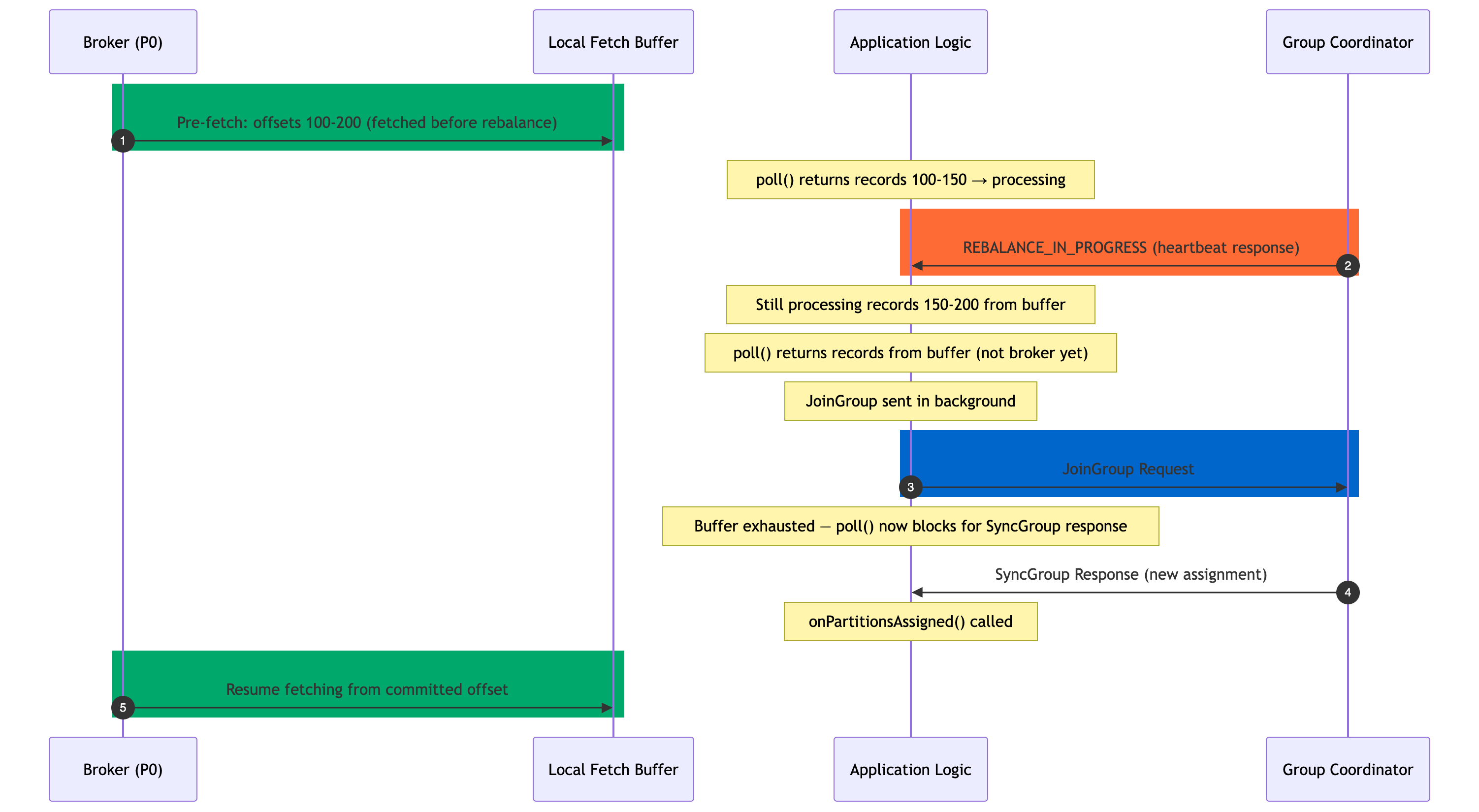
Key behavior:
Records fetched before the rebalance was detected continue to be returned by
poll()onPartitionsRevoked()is called before the JoinGroup — your code must commit offsets hereIf using auto-commit, there's a risk of reprocessing if records from the buffer weren't committed
With
enable.auto.commit=falseand manual offset management, you have full control
consumer.subscribe(topics, new ConsumerRebalanceListener() {
    @Override
    public void onPartitionsRevoked(Collection<TopicPartition> partitions) {
        // CRITICAL: commit offsets before losing partition ownership
        consumer.commitSync(currentOffsets);
    }

    @Override
    public void onPartitionsAssigned(Collection<TopicPartition> partitions) {
        // Optionally reset state, seek to specific offsets, etc.
    }
});
💡 Takeaway: Your consumer can continue processing records from its local buffer even while it's mid-rebalance. Always implement
ConsumerRebalanceListenerwith explicit offset commits inonPartitionsRevoked()to prevent duplicate processing after reassignment.
8. Real-World Impact: Consumer Lag During Rebalancing
Consumer lag is the gap between the latest offset on the broker and the last committed offset. Tools like Lenses, Kafka UI, Burrow, and Grafana + JMX visualize this lag per partition.
Lag Behavior Under Eager Rebalancing
Eager Rebalance Lag Profile (per partition):

Lag
 │
 │              ██████
 │         █████      █████
 │    ─────                 ─────────────
 │
 └─────────────────────────────────────── Time
       Rebalance    Consumption    Drain
       starts       gap            resumes
All partitions stop being consumed simultaneously
Lag grows linearly during the consumption gap
Lag drains after all consumers resume
In monitoring, you'll see a simultaneous spike across all partitions in the group
Lag Behavior Under Cooperative Rebalancing
Cooperative Rebalance Lag Profile:

Partition P0 (C1 keeps it):   ──────────────────────── [no spike]
Partition P1 (C1 keeps it):   ──────────────────────── [no spike]
Partition P2 (C2 keeps it):   ──────────────────────── [no spike]
Partition P3 (moves to C3):   ────────███──────────── [small spike, only P3]

          ↑ Round 1       ↑ Round 2
Why lag can DROP during cooperative rebalancing: Unaffected consumers continue draining their partitions. If your group was already behind (high lag), a cooperative rebalance can actually reduce overall lag because the new consumer starts consuming as soon as it gets its assignment in Round 2 — while existing consumers never stopped.
Spike is scoped: In monitoring tools, you'll only see lag growth on the moved partitions, not across the entire group.
Rebalance Duration
Approximate rebalance phases (each phase = at least one network round-trip):

Eager:      [Revoke ALL] → [JoinGroup RTT] → [SyncGroup RTT] → [Resume]
            Total: 2-10 seconds for small groups, up to 30s+ for large groups

Cooperative (2 rounds):
  Round 1:  [JoinGroup RTT] → [SyncGroup RTT] → [Partial revoke]
  Round 2:  [JoinGroup RTT] → [SyncGroup RTT] → [Assign freed partitions]
            Total: 4-6 seconds, but ONLY for moved partitions
💡 Takeaway: If your lag monitoring shows a synchronized spike across all partitions simultaneously, that's the fingerprint of an eager rebalance. Under cooperative rebalancing, the spike is narrower, shorter, and limited to moving partitions. This is also why migrating to
CooperativeStickyAssignoris one of the highest-leverage Kafka tuning changes you can make.
9. Best Practices and Configuration Recommendations
Choosing the Right Partition Assignor
| Assignor | Protocol | Stickiness | Use When |
|---|---|---|---|
RangeAssignor |
Eager | No | Simple, few consumers |
RoundRobinAssignor |
Eager | No | Even distribution needed |
StickyAssignor |
Eager | Yes | Minimize partition moves on eager rebalance |
CooperativeStickyAssignor |
Cooperative | Yes | Default for new systems (Kafka 2.4+) |
// Recommended for new systems on Kafka 2.4+
props.put("partition.assignment.strategy",
    "org.apache.kafka.clients.consumer.CooperativeStickyAssignor");
Tuning Timeout Parameters
// Tighter for fast-restart scenarios (containers/K8s)
session.timeout.ms=30000    // default: 45000
heartbeat.interval.ms=3000  // keep ~1/3 of session.timeout.ms
max.poll.interval.ms=300000 // increase if processing is slow (batch jobs)
max.poll.records=250  // lower if processing is slow per record

// For static membership — give enough time for pod restart
session.timeout.ms=60000     // must outlast your pod restart time
group.instance.id=${POD_NAME} // stable, unique per replica
Kafka Streams Tuning
Properties streamsProps = new Properties();
streamsProps.put(StreamsConfig.NUM_STREAM_THREADS_CONFIG, "4");
streamsProps.put(StreamsConfig.COMMIT_INTERVAL_MS_CONFIG, "100");
// Required for cooperative rebalancing migration from older Streams
streamsProps.put(StreamsConfig.UPGRADE_FROM_CONFIG, StreamsConfig.UPGRADE_FROM_30);

KafkaStreams streams = new KafkaStreams(topology, streamsProps);
streams.setUncaughtExceptionHandler(ex -> {
    log.error("StreamThread crashed", ex);
    if (isTransient(ex)) {
        return StreamsUncaughtExceptionHandler.StreamThreadExceptionResponse.REPLACE_THREAD;
    }
    return StreamsUncaughtExceptionHandler.StreamThreadExceptionResponse.SHUTDOWN_CLIENT;
});
REPLACE_THREAD vs SHUTDOWN_CLIENT
Decision tree for StreamsUncaughtExceptionHandler:

Exception caught in StreamThread
         │
         ▼
  Is the state store corrupted
  or processing results incorrect?
         │
    YES  │  NO
         │   └──► Is it a transient error (network, timeout)?
         │                  │
         │             YES  │  NO
         │                  │   └──► SHUTDOWN_CLIENT (unknown cause)
         │                  ▼
         │           REPLACE_THREAD ✅
         ▼
  SHUTDOWN_CLIENT ✅
ConsumerRebalanceListener Best Practices
// Always commit synchronously in onPartitionsRevoked
@Override
public void onPartitionsRevoked(Collection<TopicPartition> partitions) {
    log.info("Partitions revoked: {}", partitions);
    try {
        consumer.commitSync(currentOffsets); // don't lose progress
    } catch (CommitFailedException e) {
        log.warn("Commit failed during revocation", e);
    }
    currentOffsets.clear();
}

// With cooperative rebalancing — also implement onPartitionsLost
@Override
public void onPartitionsLost(Collection<TopicPartition> partitions) {
    // Called when partitions are lost without being revoked (e.g., session timeout)
    // Do NOT commit here — you no longer own these partitions
    log.warn("Partitions lost (no commit): {}", partitions);
    currentOffsets.keySet().removeAll(partitions);
}
💡 Takeaway: The difference between
onPartitionsRevoked(graceful) andonPartitionsLost(session timeout / eviction) is critical. Never commit offsets inonPartitionsLost— by the time it's called, another consumer may already own those partitions.
10. Summary Comparison Table
| Dimension | Eager Rebalancing | Cooperative Rebalancing | Static Membership |
|---|---|---|---|
| Protocol rounds | 1 (all-or-nothing) | 2 (discovery + revoke) | N/A (modifies membership behavior) |
| Consumption during rebalance | ⛔ All consumers stop | ✅ Unaffected consumers continue | ✅ No rebalance on restart |
| Rebalance scope | All partitions revoked | Only moved partitions revoked | No rebalance within session timeout |
| Partition moves | All reassigned | Only necessary moves | Same as base protocol |
| Assignors | Range, RoundRobin, Sticky | CooperativeStickyAssignor | Orthogonal — works with any |
| Kafka version | All versions | 2.4+ (KIP-429) | 2.3+ (KIP-345) |
| Rebalance duration | Medium–High | Low (for unaffected partitions) | Near-zero on restart |
| Best use case | Legacy / migration | All new systems | K8s rolling deploys |
| Lag impact | Spike on all partitions | Spike only on moved partitions | No spike on restart |
| Complexity | Low | Medium (2-round protocol) | Low (just set instance ID) |
Common Pitfalls
1. Not implementing ConsumerRebalanceListener
Relying on enable.auto.commit=true with long processing loops. Auto-commit fires on poll(), not on processing completion. If a rebalance happens mid-batch, you may commit offsets for records that were processed by the previous owner but not yet by you.
Fix: Disable auto-commit, use ConsumerRebalanceListener, commit in onPartitionsRevoked.
2. Using CooperativeStickyAssignor without migrating properly
Mixing consumers with StickyAssignor (eager) and CooperativeStickyAssignor (cooperative) in the same group. The coordinator requires all members to agree on the protocol. Mixed groups will fall back to eager, silently defeating the upgrade.
Fix: Do a rolling deploy where you first add CooperativeStickyAssignor alongside StickyAssignor in the strategy list, then remove StickyAssignor in the next rollout.
// Transitional config (step 1 of migration)
props.put("partition.assignment.strategy",
    "org.apache.kafka.clients.consumer.CooperativeStickyAssignor," +
    "org.apache.kafka.clients.consumer.StickyAssignor");
3. Setting session.timeout.ms too low on containerized workloads
Container runtimes can pause JVM threads during GC or CPU throttling. A 10-second session timeout can trigger spurious rebalances under load.
Fix: Set session.timeout.ms to at least 30–45s in containerized environments. Monitor kafka_consumer_heartbeat_response_time_max to tune appropriately.
4. max.poll.interval.ms exceeded by slow message processing
If your processing loop takes longer than max.poll.interval.ms, the consumer is kicked out even though the heartbeat thread is running fine. This creates a confusing pattern: the consumer appears alive to operators, but Kafka evicts it.
Fix: Lower max.poll.records, process asynchronously, or increase max.poll.interval.ms to match your realistic worst-case processing time.
5. Static membership group.instance.id conflicts
Two pods accidentally get the same group.instance.id (e.g., both named consumer-0 in different namespaces but same consumer group). The second pod will steal the first pod's partition assignment.
Fix: Include namespace or unique identifiers in the instance ID, e.g., ${NAMESPACE}-${POD_NAME}.
6. Forgetting onPartitionsLost with cooperative rebalancing
onPartitionsLost was introduced specifically for cooperative rebalancing and is called when a consumer loses partitions due to a session timeout rather than a graceful revocation. Failing to implement it means your application doesn't clean up state (local caches, open file handles, in-flight writes) for those lost partitions.
Fix: Always implement onPartitionsLost separately from onPartitionsRevoked when using cooperative rebalancing.
Understanding rebalancing at this level transforms how you approach Kafka operational issues — from reactive lag investigation to proactive configuration that keeps your consumers healthy under any conditions.
Comments
Join the discussionNo comments yet. Be the first to comment.


